
Once a team adopts AI coding assistants, the first gains show up at the
individual level: one developer can draft, modify, and refactor code
much faster than before.
But delivery speed is rarely limited by typing.
When you look at the full delivery lifecycle, from requirements through
release, new friction appears:
- Ambiguous requirements become code quickly, and misunderstandings scale with them.
- Reviews have to process more change, and inconsistency becomes easier to introduce.
- More integration and testing issues surface because “generated” doesn’t mean “aligned.”
- Production risk is harder to reason about when the volume of change rises.
So yes, local speed improves. But that doesn’t automatically
translate into system-level throughput. It’s like buying a Ferrari and driving it on muddy roads: the engine is
powerful, but your arrival time is determined by road conditions and
traffic. In our experience, the real question isn’t “How do we generate more code?” It’s
how do we make AI-generated changes governable, reviewable, and reusable,
so teams get faster and safer?
That led our Thoughtworks internal IT teams (Global IT Services) to a
method and workflow we now call Structured Prompt-Driven Development (SPDD).
SPDD aims to turn AI assistance from personal efficiency into an organization-level
capability that scales, without trading away quality.

Prompts as First-Class Delivery Artifacts
What is SPDD?
Structured Prompt-Driven Development (SPDD) is an engineering method
that treats prompts as first-class delivery artifacts.
Instead of relying on ad hoc chats, SPDD turns prompts into assets that
can be: version controlled, reviewed, reused, and improved over time.
Teams use structured prompts to capture requirements, domain language,
design intent, constraints, and a task breakdown. Then the LLM generates
code within a defined boundary, so output becomes more predictable and
easier to validate.
It has two core components
The REASONS Canvas
The REASONS Canvas is a structure for generating prompts. It forces
clarity around requirements, domain model, solution approach, system
structure, task decomposition, reusable norms, and safeguards. So the
LLM is guided by intent, not guesswork.
The REASONS Canvas is a seven-part structure that guides a prompt from
intent → design → execution → governance.

Abstract parts (intent & design)
- R — Requirements: What problem are we solving, and what is DoD?
- E — Entities: Domain entities and relationships.
- A — Approach: The strategy of how we’ll meet the requirements.
- S — Structure: Where the change fits in the system; components and dependencies.
Specific parts (execution)
- O — Operations: Break the abstract strategy into concrete, testable implementation steps.
Common standards parts (governance)
- N — Norms: Cross-cutting engineering norms (naming, observability, defensive coding, etc.).
- S — Safeguards: Non-negotiable boundaries (invariants, performance limits, security rules, etc.).
The canvas aligns intent and boundaries before code is generated, moving uncertainty to the left.
Because the structured prompt captures the full specification, reviewers reason about a single artifact instead of scattered chat logs and partial diffs.
By following the same structure, every prompt becomes governable in the same way.
And as domain knowledge and design decisions accumulate in each prompt, they compound individual expertise across iterations and reduce variability across the team.
The SPDD workflow
The workflow brings prompts into the same discipline as code: commit
history, review, and quality gates. It also enforces a simple but powerful rule:
When reality diverges, fix the prompt first — then update the code.
Over time, this changes how teams work. Reviews move away from “spot
the bug” toward “check the intent.” Rework becomes more controlled. And
successful patterns naturally accumulate into a reusable prompt library
that supports AI-First Software Delivery (AIFSD).
If you’ve known about Spec-Driven
Development,
you’ll recognize the same starting point: write the spec clearly first,
then let the model implement. SPDD takes a different angle. It treats
structured prompts as governed, reusable, versioned team assets (REASONS
+ workflow) that evolve alongside the code – an approach that Birgitta
Böckeler categorizes as a spec-anchored approach.
The goal of the SPDD workflow is to turn business input → abstraction →
execution → validation → release into a “closed loop”—and to make sure
prompt assets and code evolve together, not separately.

SPDD workflow
The aim of this workflow is to anchor collaboration on the prompts, so
that developers and product owners can avoid repeated cycles of alignment.
The prompt sets an explicit boundary for code generation, reducing the
randomness of the LLM’s non-determinism, making it easier to govern. By
treating the structured prompts as first-class artifacts in version
control, we turn successful practices into reusable assets, improving
consistency and reducing reinvention.
In practice these steps are carried out through commands provided
by openspdd, a command-line tool that
implements the SPDD workflow. The table below summarizes each
command.
| Command | Type | Purpose |
|---|---|---|
| /spdd-story | Optional | Breaks a large requirement into independent, deliverable user stories following the INVEST principle. |
| /spdd-analysis | Core | Extracts domain keywords from requirements, scans relevant code, and produces a strategic analysis covering domain concepts, risks, and design direction. |
| /spdd-reasons-canvas | Core | Generates the full REASONS Canvas — an executable blueprint from high-level rationale down to method-level operations. |
| /spdd-generate | Core | Reads the Canvas and generates code task by task, strictly following the operations, norms, and safeguards defined in the prompt. |
| /spdd-api-test | Optional | Generates a cURL-based API test script with structured test cases covering normal, boundary, and error scenarios. |
| /spdd-prompt-update | Core | Incrementally updates the Canvas when requirements change (requirements → prompt → code). |
| /spdd-sync | Core | Synchronizes code-side changes (refactoring, fixes) back into the Canvas so the prompt stays an accurate record of the current code (code → prompt). |
Enhancing a billing engine with SPDD
A complicated workflow is difficult to understand in the abstract, so
we have prepared an example workflow of enhancing an existing software
system. This system, and its enhancement, are neccessarily small in order
to be comprehensible within a tutorial article. That said the enhancement
example is a full end-to-end example: from creating initial
requirements, to analyzing business requirements, to generating and reviewing a structured prompt,
to producing and verifying code, to final cleanup and testing.
You can follow along with this example by installing
openspdd in your own environment.
The current system
The current system is a simple billing engine that calculates bills
for using a large-language model. It accepts a record that captures how
many tokens are used in a session and calculates a bill.
The complete codebase for this initial version is
available on GitHub.
The repository includes the initial requirements story
and all the SPDD artifacts used to generate it.
For brevity, we don’t describe that initial generation here, but it follows essentially the same steps as that for the enhancement.
We focus on describing the enhancement because most work on a system are enhancements.
The enhancement
Driven by evolving business requirements and direct user feedback, we are enhancing the billing engine to transition from a static pricing model to a more sophisticated,
flexible infrastructure. This update aims to support diverse subscription strategies and variable, model-specific pricing through the following key changes:
- API enhancement: update the existing
POST /api/usage
endpoint to accept a new, requiredmodelIdparameter
(e.g., “fast-model”, “reasoning-model”). - Model-aware pricing: shift from a single global rate to dynamic
pricing, where costs vary depending on the specific AI model
invoked. - Multi-plan billing logic: introduce distinct billing behaviors
based on the customer’s subscription tier: - Standard plan (optimized): retains the global monthly quota,
but any overage usage is now calculated using model-specific
rates. - Premium plan (new): operates without a quota limit. It
introduces split billing, where prompt tokens and completion
tokens are charged separately at different rates depending
on the model used. - Architectural scalability: implement an extensible design pattern
(such as Strategy or Factory) to cleanly isolate the calculation
formulas for different plans, ensuring the system can easily
accommodate future pricing models.
Since this new section encompasses both business requirements and technical details,
it is typically completed collaboratively through a pairing session between a PO (or BA) and a developer.
Step 1: Create initial requirements
To kick off the process quickly, we can use the /spdd-story
command to generate a user story directly based on the enhancement. Generally, user stories are provided by the PO or BA.
However, in our workflow, we can transform stories of any form into a consistent format and dimension.
As long as there is shared alignment on the final acceptance criteria, this step can be performed by a PO, BA, or developer, depending on the team’s flexible division of labor.
Instruction:
How spdd-story works
This command breaks a large requirement into independent,
deliverable user stories following the INVEST principle (1–5 days
of work each). Each story includes acceptance criteria written in
business language, ready to serve as input for
/spdd-analysis.
Its purpose is to make large requirements manageable and to ensure a standardized,
predictable format for the next steps.
The AI analyzed the enhancement description and split it into two
user stories:
The auto-generated stories are detailed enough to serve as a baseline
for a formal project. For this walkthrough we consolidate them into a
single simplified story so the example stays self-contained.
Instruction:
Consolidate the following two user stories into a single, simplified
story:
@[User-story-1-1-initial]Multi-Plan-Billing-Foundation-&-Standard-Plan-Model-Aware-Pricing.md
@[User-story-1-2-initial]Premium-Plan-Split-Rate-Billing.md
Requirements:
1. Merge both plans (Standard and Premium) into one coherent story.
2. Keep only the sections: Background, Business Value, Scope In, Scope Out, and Acceptance Criteria.
3. Strip implementation-level detail — focus on what the system should do, not how.
4. Acceptance Criteria must use Given/When/Then format with concrete numeric examples.
5. Keep the result concise — no more than one page.
6. Only keep three high-level ACs.
Instructions of this kind rarely produce identical text on every run —
models and sampling introduce small differences — so we still expect to
review and tweak the output before treating it as final. The combined
story below is the version we refined for this walkthrough: a deliberately
simplified consolidation of the two initial stories.
Step 2: Clarify analysis
Before jumping into implementation, the developer reviews the user
story to build a shared understanding of what it means in practice. If
there are obvious business-level issues, this is the point to align with
the BA or PO. In this case the story is clear enough, so we move
straight to breaking it down along three dimensions: core logic, scope
boundaries, and definition of done.
Core logic
One new required field on the API: modelId. The customer
now tells us which AI model they used — this is the key that unlocks the
right price.
- Standard Plan: Customer has a monthly token quota. Usage
within quota is free. Overage is charged at a model-specific rate
(e.g., fast-model $0.01/1K vs. reasoning-model $0.03/1K). Existing
quota logic stays; only the rate lookup changes. - Premium Plan: No quota. Every token is billed from the
first one. Prompt tokens and completion tokens are charged separately,
each at a model-specific rate. Bill = prompt charge + completion
charge. This plan is entirely new. - Routing: The system determines the customer’s plan and
dispatches to the matching billing formula. The design must be easy to
extend — Enterprise plans (Story 2) are next.
Scope boundaries
We are only calculating the current bill. We are NOT building customer
CRUD, NOT querying historical bills, NOT managing subscriptions, and NOT
adding/removing models.
Definition of done
The following scenarios restate the story’s acceptance criteria
with the implementation detail the team needs to verify. The fourth
item (Response format) is not a new business AC — it captures the
non-functional contract the developer adds to make the criteria
testable end-to-end.
- Validation: Missing
modelId→ HTTP 400.
Unknown customer → HTTP 404. Negative tokens → HTTP 400. All
existing validations remain intact. - Standard Plan billing: A customer with a 100K quota and
90K already used submits 30K tokens for fast-model ($0.01/1K).
Expected result: 10K covered by quota, 20K overage, charge $0.20.
The same request with reasoning-model ($0.03/1K) yields $0.60 —
same quota logic, different rate. - Premium Plan billing: A customer submits 10K prompt
tokens + 20K completion tokens for reasoning-model (prompt $0.03/1K,
completion $0.06/1K). Expected result: $0.30 + $1.20 = $1.50. No
quota, no overage — prompt and completion are billed separately. - Response format: HTTP 201 returning bill ID, customer ID,
token counts, timestamp,modelId, and a plan-appropriate
charge breakdown.
If all these scenarios pass, we’ve conquered this story.
Step 3: Generate analysis context
With the requirements and scope clarified, we use the
/spdd-analysis command. By feeding it the business
requirements, we instruct the AI to generate a comprehensive analysis
context.
How spdd-analysis works
This command extracts domain keywords from the business
requirements (e.g. “billing”, “quota”, “plan”) and uses them to
scan only the relevant parts of the codebase — not all of it. It
identifies existing concepts, new concepts, key business rules,
and technical risks.
The output is a context-rich document covering domain concept
recognition, strategic direction, and risk analysis. It serves as
input for the next step: generating the REASONS Canvas.
Instruction:
/spdd-analysis
@[User-story-1]Multi-Plan-Billing-Foundation-&-Model-Aware-Pricing.md
Generated artifact: the initial analysis context document.
This command produces a strategic-level analysis grounded in actual
codebase exploration. The output focuses entirely on the “what” and
“why,” deliberately avoiding granular implementation details at this
stage. It typically covers:
- Domain concepts: existing vs. new, relationships, business
rules - Strategic approach: solution direction, design decisions,
trade-offs - Risks & gaps: ambiguities, edge cases, technical risks,
acceptance-criteria coverage
Review and refine the analysis context
With our own understanding of the business requirements in mind, we
review the generated analysis document—focusing on the areas
highlighted in the alignment skill. This review serves
two purposes: confirming that our understanding aligns with the AI’s
interpretation, and discovering edge cases or boundary scenarios the AI
might surface that we hadn’t considered.
In this specific instance, the review focused on several critical
areas:
- Whether the Strategy Pattern was appropriately considered.
- Adherence to the OOP principles established in the existing system,
specifically ISP and SRP. - The validity of the proposed strategy for adding new fields.
- Identifying edge cases not previously anticipated.
- Uncovering potential technical risks.
Upon completing the review, the AI’s analysis largely aligned with
our architectural intent; in fact, its considerations were even more
comprehensive than ours in certain areas.
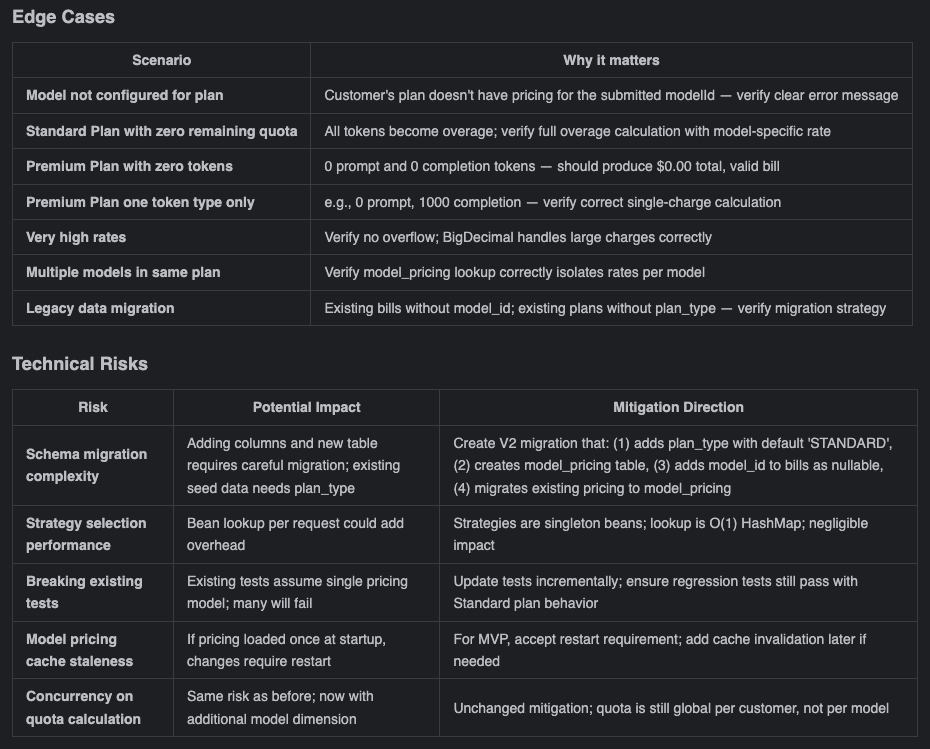
Edge cases and risks from the
analysis document
To be transparent, at this stage we only possess a high-level
conceptual alignment. While we can quickly envision the implementation
for areas where we have prior experience, we cannot completely map out
all the granular technical details for the unfamiliar parts right
now.
However, that is perfectly fine. The overarching direction is aligned.
We can proceed to the next step: observing how the AI “simulates” the
concrete implementation details within our established framework and
context. Once we have these tangible details, we can uncover deeper,
hidden issues and make informed trade-offs based on the actual
scenario—adopting the approaches where the benefits outweigh the
drawbacks, and discarding the rest.
Decision: accept the analysis as-is and proceed.
Step 4: Generate structured prompt
How spdd-reasons-canvas works
This command reads business context (the output of
/spdd-analysis, or a direct requirements description)
and combines it with the current state of the codebase. It then
generates a design specification across all seven REASONS
dimensions — from “why are we doing this” to “what must we not
do.”
The output is an executable blueprint. The Operations
section is precise down to method signatures, parameter types, and
execution steps.
Instruction:
/spdd-reasons-canvas
@GGQPA-001-202603191100-[Analysis]-multi-plan-billing-model-aware-pricing.md
Generated artifact: the initial structured prompt.
By this point, we’ve already gone through high-level strategy during
the analysis phase—so when reviewing the structured prompt, we’re not
starting from scratch. Instead, we’re examining how the AI has
translated our shared understanding into the REASONS Canvas structure:
from strategy to abstraction to concrete details.
Think of it as a progression: the analysis phase gave us strategic
clarity; now we’re checking whether that clarity has been faithfully
carried through into the architectural abstractions and implementation
specifics. This is intent alignment at a deeper level—ensuring that
before any code is generated, the AI has effectively “simulated” the
entire solution within our defined framework. We get to review from a
global perspective rather than getting lost in details from the
start.
Focus the review on the areas highlighted in the abstraction-first skill. In this case,
this foundational context is already embedded in the codebase and the previous
structured prompt. Consequently, when generating the structured
prompt for this iteration, the AI naturally factors in these
architectural guidelines and OO principles. As a result, even though the
generated content is highly complex, there are remarkably few major
issues. We can opt to proceed with generating the code using this
structured prompt first, and then conduct a deeper review to identify
any potential code-level anomalies later.
So far, we have reached a strong consensus at the intent level,
clarifying both the core problem and the resolution path. While there
may be slight omissions in the details, this is not a concern; having
aligned on the overall scope with the AI makes local optimizations
highly controllable. Now, we transition into the code generation
phase.
Step 5: Generate code
This step is more involved as we are generating the product code,
tests, and our reviews have two alternative outcomes.
Generate product code
Once our structured prompt is locked in, use it to generate the
product code.
How spdd-generate works
This command reads the REASONS Canvas and generates code task
by task, following the order defined in Operations. It strictly
adheres to the coding standards in Norms and the constraints in
Safeguards — no improvisation, no features beyond what the spec
defines.
The core principle: the prompt captures the intent, and the code
is the implementation of that intent. Generated code must correspond
one-to-one with this specification.
Instruction:
/spdd-generate
@GGQPA-001-202603191105-[Feat]-multi-plan-billing-model-aware-pricing.md
Generated artifact: code generated based on the structured
prompt.
Thanks to the multiple rounds of logical deduction we did earlier
using structured prompts, we approach the code review with a clear
focus and set of priorities:
- Architecture: does the code strictly follow our expected 3-tier
architecture? - Business logic: does the Service layer implementation perfectly
align with our initial intent? - Scope of change: are the modifications strictly confined to the
boundaries defined by the structured prompt, avoiding unrelated
changes or scope creep?
In this specific case, thanks to the highly precise context, the
generated code largely met our expectations, aside from a few
potential “magic numbers.” We will optimize these out once the
functional verification is complete.
The key takeaway here is: don’t worry about making mistakes, and
don’t stress over not catching every single detail perfectly on the
first try. As long as we keep iterating and advancing through the SPDD
workflow, there are plenty of opportunities to course-correct. Minor
code smells are fine for now—we verify the core functionality first,
then circle back to optimize.
Feature verification
During feature validation, the SPDD workflow provides the
/spdd-api-test command to generate functional testing
scripts.
How spdd-api-test works
This command extracts API endpoint information from the code
implementation or acceptance criteria and generates a cURL-based
test script. The script includes a structured test-case table
covering normal scenarios, boundary conditions, and error
scenarios. When executed, it outputs expected-vs-actual comparison
results.
Instruction:
/spdd-api-test
Generated artifact: the API test script.
Guided by the defined rules in the command, the AI generates a
script that formulates the required test scenarios using curl commands.
We can review these AI-generated scenarios in the “TEST CASE OVERVIEW”
section of the script.
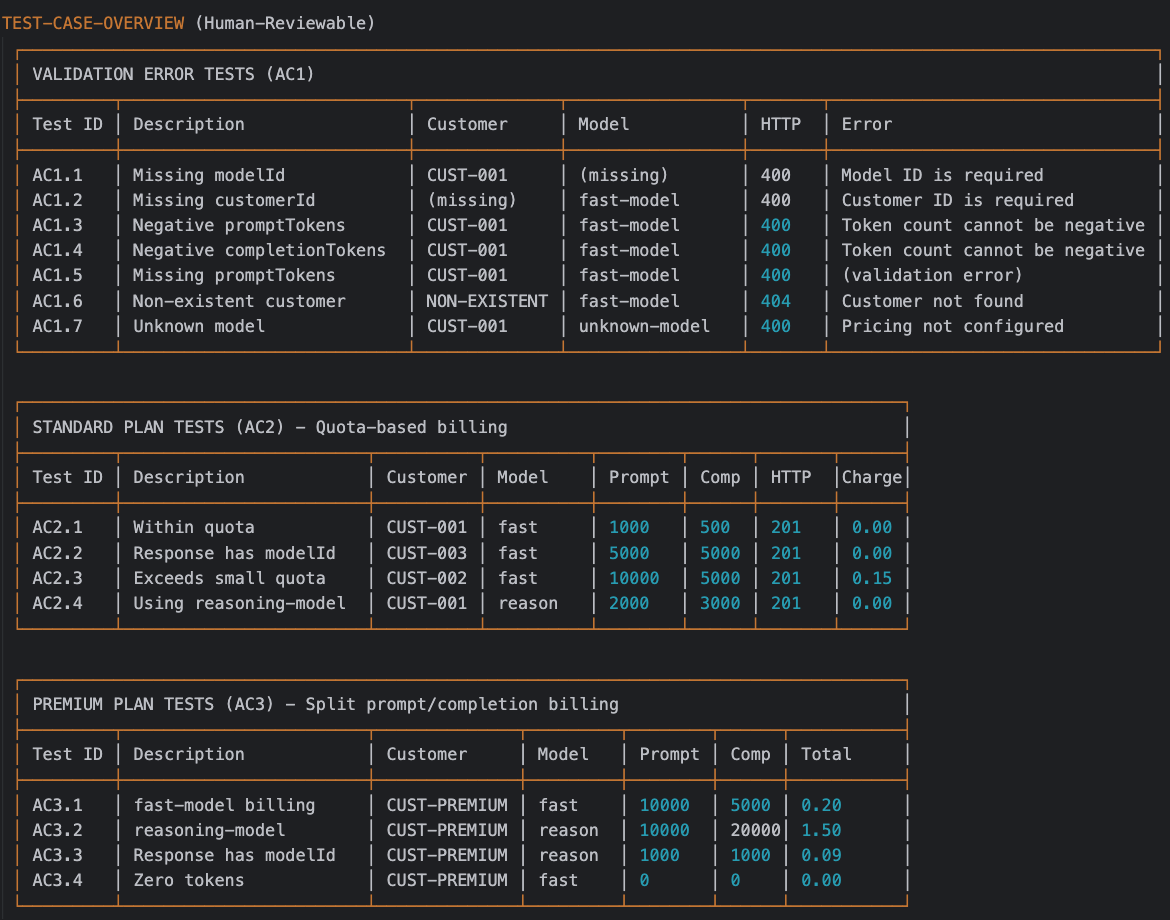
Generated API Test Script
Execution: once the script is generated, run it:
sh scripts/test-api.sh
Result: all functional tests passed successfully.
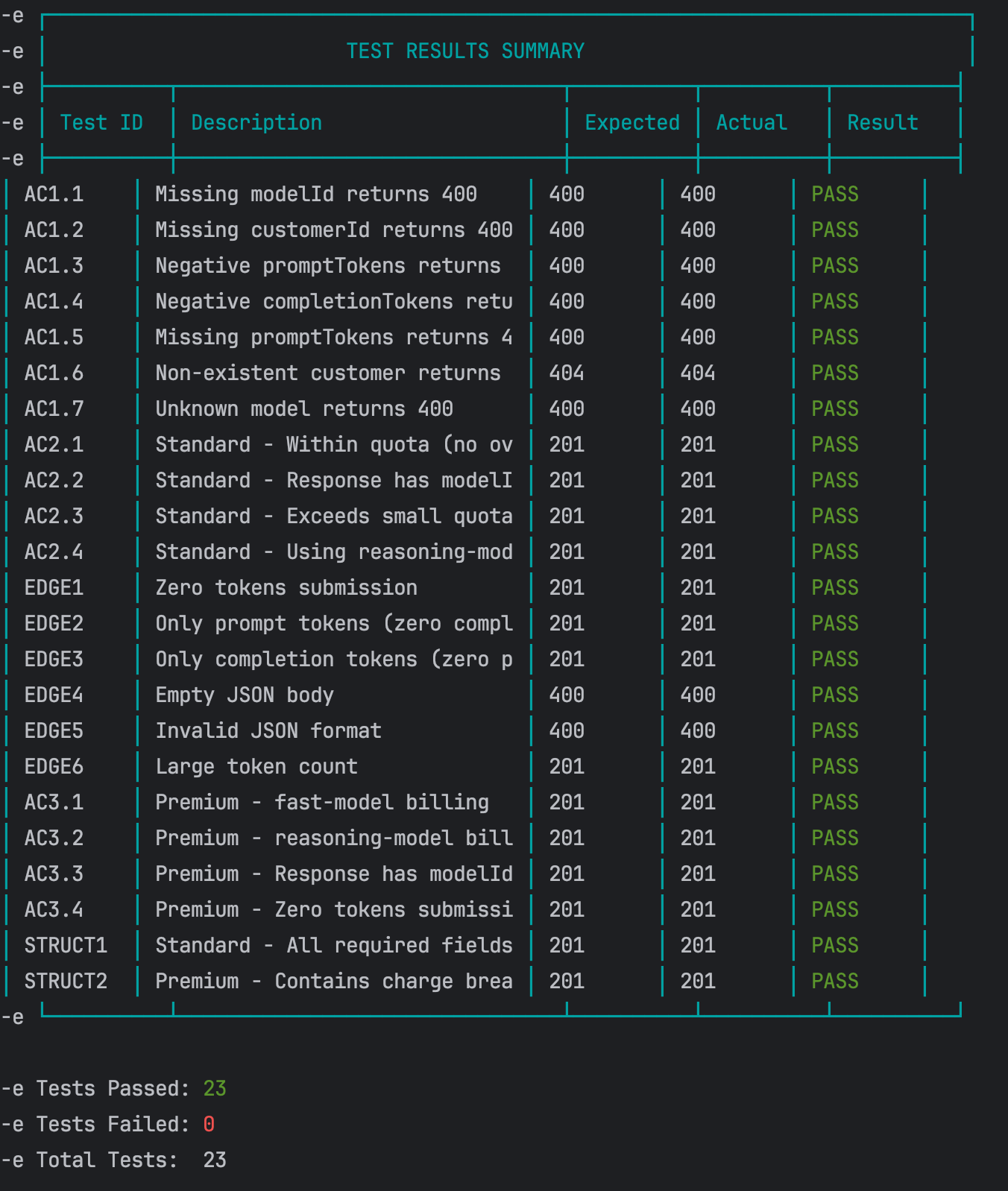
API Test Results
Code review & final adjustments
Thanks to the rigorous intent alignment in the first several steps, the
heavy lifting is already done. At this stage, the remaining issues are
usually minor logic discrepancies or surface-level code smells.
To maintain precision in our engineering practices, we categorize
these final adjustments into two distinct types—based on whether they
change the system’s observable behavior—and handle them using
different strategies within the SPDD workflow:

Two responses to code review changes
Logic corrections (behavior changes)
Strategy: update the prompt first, then generate code. For issues
related to business rules or logic mismatches (which inherently change
the observable behavior of the software), always update the structured
prompt to lock in the correct intent before touching the code. This is
an update or bug fix, not a refactoring.
For instance, when persisting modelId in the bill, we
currently allow this field to be nullable. The underlying reason is the
need to maintain backward compatibility with historical data, making
this workaround a reasonable architectural decision.
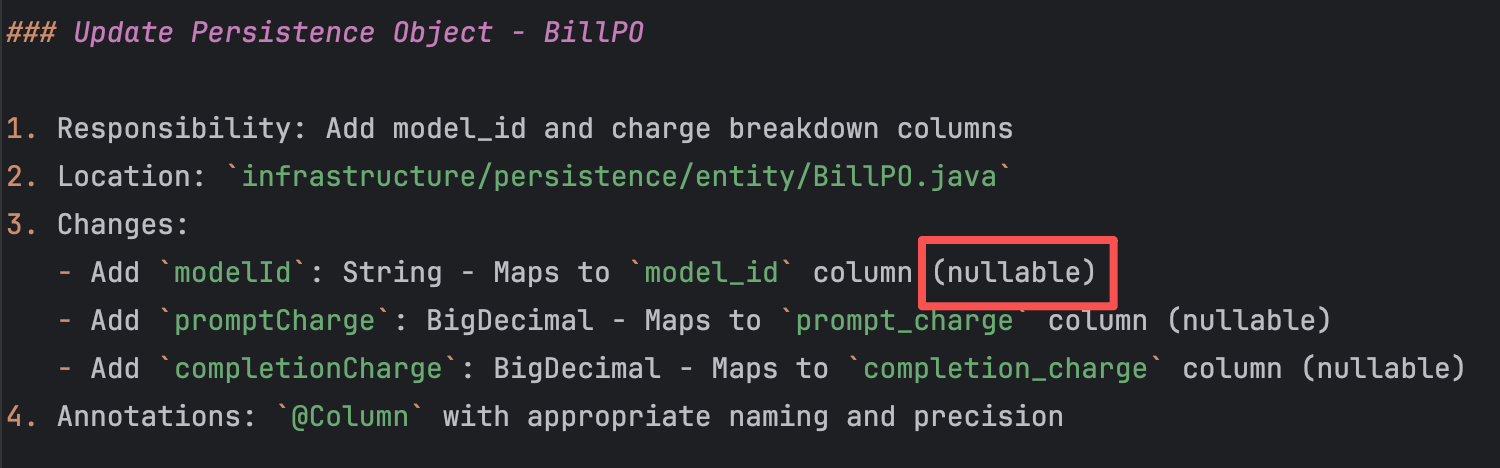
Prompt needs update
However, there is an alternative. If the business stakeholders can
confirm what the modelId value should be prior to this
change, we can unify the system’s behavior and eliminate this potential
technical debt. Let’s assume that, after confirming with the business,
the modelId for all historical bills should be set to
fast-model.
With this clear intent, we interact with the AI:
How spdd-prompt-update works
This command incrementally updates the existing Canvas. It
modifies only the sections affected by the change and preserves
everything else. Based on the type of change — new requirement,
architectural adjustment, or constraint change — it automatically
determines which REASONS dimensions need updating.
This differs from /spdd-sync: sync flows from
code to spec when code has changed; prompt-update flows from
requirements to spec when requirements have changed.
Instruction:
/spdd-prompt-update @GGQPA-001-202603191105-[Feat]-multi-plan-billing-model-aware-pricing.md
model_id is a required field, and its default value is fast-model.
Based on this decision, update the corresponding parts of the structured prompt.
The AI updates the structured prompt based on this instruction.
Updated artifact: the updated structured prompt.
Once confirmed, use the /spdd-generate command to
update the corresponding code based on the newly updated structured
prompt:
/spdd-generate
@GGQPA-001-202603191105-[Feat]-multi-plan-billing-model-aware-pricing.md
The AI, guided by the rules defined within the
/spdd-generate command, comprehends the required changes
and performs targeted updates exclusively on the affected
codebase.
Updated artifact: the updated code.
It is important to note that we do not regenerate the entire
codebase. We continue using the existing structured prompt and the AI
handles targeted diffs:
- Identify the mismatch: notice that the behavior of
modelIdduring persistence is inconsistent with the new
business requirement (it must be mandatory with a default). - Target the prompt snippet: copy the specific section from the
structured prompt that defines the outdated logic. - Update the prompt: paste the extracted snippet into the chat
alongside the revised business rule, instructing the AI to update
the structured prompt first. - Generate targeted code updates: once the prompt reflects the new
truth, run/spdd-generatepointing to the updated file.
The AI automatically performs targeted diffs exclusively on the
affected codebase, rather than regenerating everything from
scratch.
Refactoring (clean code & style)
“A change made to the internal structure of software to make it easier
to understand and cheaper to modify without changing its observable
behavior.”— Martin Fowler
Strategy: refactor the code first, then sync back to the prompt.
For structural or stylistic issues that do not change observable
behavior, instruct the AI to refactor the code directly, and then use
a sync command to update the prompt documentation.
For example, the AI-generated BillingServiceImpl class
contains some hardcoded magic numbers that need to be extracted into
meaningful constants.
private int calculateRemainingQuota(String customerId, PricingPlan plan) {
        if (plan.getMonthlyQuota() == null || plan.getMonthlyQuota() == 0) {
            return 0;
        }

        LocalDate currentDate = LocalDate.now(ZoneOffset.UTC);
        LocalDateTime monthStart = currentDate.withDayOfMonth(1).atStartOfDay();
        LocalDateTime monthEnd = currentDate.plusMonths(1).withDayOfMonth(1).atStartOfDay();

        Integer currentMonthUsage = billRepository.sumIncludedTokensUsedForMonth(customerId, monthStart, monthEnd);
        return plan.getMonthlyQuota() - currentMonthUsage;
    }
Instruction 1:
@BillingServiceImpl.java In the calculateRemainingQuota method,
there are some magic numbers that need to be processed as
constants
The AI executes the code refactoring based on this instruction
(remember the golden rule: always refactor in small, incremental
steps). If the output meets our expectations, we use the
/spdd-sync command to synchronize these newly updated
code details back to their corresponding locations within the
structured prompt.
Instruction 2:
How spdd-sync works
This command compares the current code against the Canvas
specification, then synchronizes code-side changes (refactoring,
bug fixes, new components) back into the Canvas.
The goal is to keep the Canvas as an accurate design document
for the current code, rather than an outdated historical
record.
/spdd-sync
The AI summarizes the changes based on the rules defined in the
/spdd-sync command. It then follows the structural
requirements of the REASONS Canvas to write the detailed code
description updates back into the corresponding sections of the
structured prompt.
Once both commands are executed, we can see all the prompt and code
changes here.
For any deeper or hidden code smells, simply repeat these steps.
The golden rule is to always keep the structured prompt synchronized
with your latest codebase.
Regression test
Once all optimizing is complete, restart the service and run the
API test script one more time to ensure no core functionality was
broken during the cleanup.
Result: all passed.
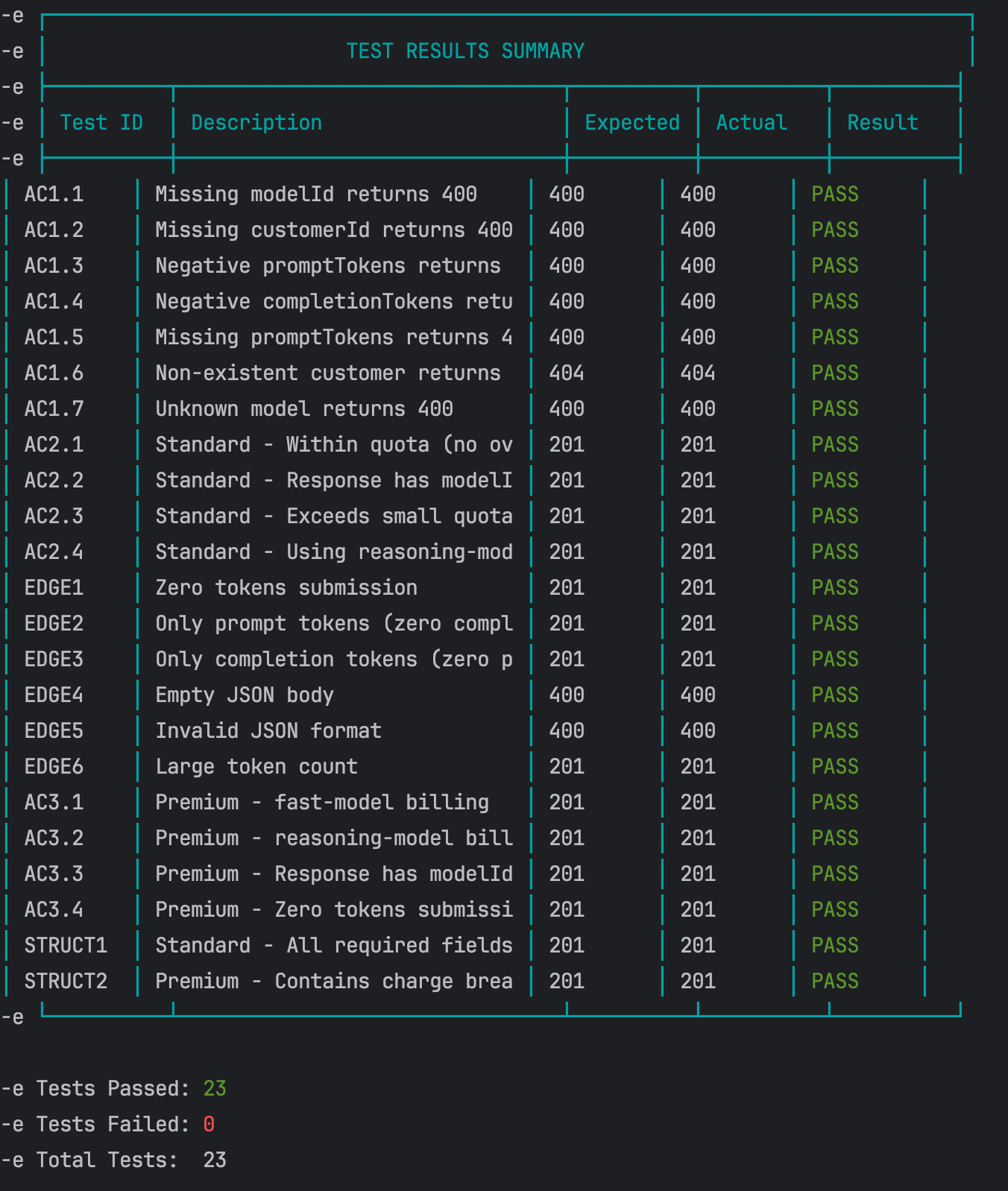
Regression Test Results
Step 6: generate unit tests
Functional testing alone is insufficient for robust validation; it
acts primarily as an auxiliary check and is not factored into code
coverage metrics. The final sign-off on core logic requires
comprehensive unit tests. Currently, the SPDD workflow does not have
dedicated testing commands finalized (these will be introduced in
future iterations). As an interim solution, we utilize a
template-driven approach to generate structured prompts for unit
testing.
Generate the initial test prompt
We begin by combining the implementation details with our
standardized testing template to generate a baseline test prompt.
Instruction:
@GGQPA-001-202603191105-[Feat]-multi-plan-billing-model-aware-pricing.md,
combined with the template @TEST-SCENARIOS-TEMPLATE.md, please
generate a test prompt file.
Deduplicate and refine scenarios
After generating the initial structured test prompt, some of the
proposed test scenarios were duplicates of what we already had. To
address this, we continued the dialogue, instructing the AI to
cross-reference the generated prompt with the existing test suite,
identify the genuinely new scenarios, and remove any
redundancies.
Instruction:
@GGQPA-001-202603191105-[Test]-multi-plan-billing-model-aware-pricing.md
There are tests that are duplicated with existing ones, compare the
relevant tests that exist, and then only add tests for new
scenarios
Updated artifact: the test structured prompt.
Generate the unit test code
Once the refined test scenarios are reviewed and confirmed, use the
finalized test prompt to drive the actual code generation.
Instruction:
Based on the generated test prompt
@GGQPA-001-202603191105-[Test]-multi-plan-billing-model-aware-pricing.md,
please generate the corresponding unit test code.
Result: all tests passed. Commit for tests.
What this example delivered
This marks the conclusion of a complete SPDD workflow. Through this
standardized process, we successfully delivered the following key
outcomes:
- A business logic implementation with exceptionally high intent
alignment (~99%). - Complete engineering transparency, including a clear
understanding of the implementation path, technical decisions, and
accepted trade-offs. - A structured prompt asset tightly synchronized with the current
codebase, laying a solid foundation for future iterations. - Compounding human expertise, fostering a continuous accumulation
of developer experience and mental models as we iterate
collaboratively with the AI.
View the complete code diff for this enhancement on GitHub.
We’ve also prepared a bonus enhancement feature—Enterprise
Plan Volume-Based Tiered Billing. If you’re interested in getting
some hands-on practice, we highly encourage you to tackle it using the
SPDD workflow outlined above.
Three core skills
SPDD is a material change in how developers build software. In our work
we have identified three core skills that they need in order to do their
work effectively. These skills reflect where the value of developers
is shifting in an AI-assisted world.
Abstraction first
design before you generate
Before generating any code, you need to be clear about what objects
exist, how they collaborate, and where the boundaries are. Without that,
AI often sprints on implementation details while the structure falls apart.
Unclear responsibilities, duplicated logic, inconsistent interfaces, and
the cost shows up later in review and rework.
Alignment
lock intent before you write code
Before implementation, you need to make “what we will do / what we won’t
do” explicit, and agree on the standards and hard constraints up front.
Otherwise you end up with fast output and slow rework.
Iterative Review
turn output into a controlled loop
You want AI assistance to behave like an engineering process, not a
one-shot draft. Without a disciplined review-and-iterate loop, teams either
keep forcing the model to patch things until the solution drifts, or they
restart repeatedly and lose control of cost and time.
Where SPDD fits
Fitness assessment
SPDD is an engineering investment. The table below rates how well it pays off by scenario, from highly recommended (5 stars) to not suitable (1 star).
| Rating | Scenario | Notes |
|---|---|---|
| ★★★★★ | Scaled, standardized delivery | High-repeat business logic that needs long-term maintainability (e.g., building many similar APIs, automating core business workflows). |
| ★★★★★ | High compliance and hard constraints | Environments where you must follow regulations, security standards, or strict architectural rules (e.g., financial core systems, multi-channel / multi-client deployments). |
| ★★★★☆ | Team collaboration and auditability | Multi-person delivery where changes must be fully traceable and reviewable end-to-end. |
| ★★★★☆ | Cross-cutting consistency work | Complex refactors where logic must stay tightly synchronized across multiple microservices or different languages. |
| ★★☆☆☆ | Firefighting hotfixes | “Stop the bleeding” production fixes where speed matters more than architectural discipline. |
| ★★☆☆☆ | Exploratory spikes | When the goal is to validate an idea quickly rather than ship production-quality software, SPDD’s governance overhead won’t pay back. |
| ★★☆☆☆ | One-off scripts | Disposable data cleanup or temporary scripts where SPDD’s upfront cost is too high relative to the value. |
| ★☆☆☆☆ | Context black holes | When the domain is poorly defined and business rules are unclear, you can’t set meaningful boundaries for the model. |
| ★☆☆☆☆ | Pure creative / visual work | Tasks driven by taste and aesthetics rather than logic (e.g., UI visual exploration, marketing copy). |
Trade-offs to consider
Return on investment
| Benefit | Impact | Speed | What you get |
|---|---|---|---|
| Determinism | High | Immediate | Encode logic in a precise spec, which significantly reduces hallucination and “creative” interpretation. |
| Traceability | High | Immediate | Every meaningful change can be traced back to the structured prompt, closing the audit loop. |
| Faster reviews | High | Short-term | Code “arrives” closer to team standards, so reviews focus on logic and design, not formatting and cleanup. |
| Explainability | Medium-High | Gradual | Intent and behavior are visible at the natural-language level, lowering the cognitive load for understanding and maintenance. |
| Safer evolution | High | Long-term | Well-defined boundaries and stepwise implementation make targeted changes lower-risk and easier to iterate. |
Upfront investment
| Area | Barrier | Nature | What it takes |
|---|---|---|---|
| Mindset shift | High | Ongoing training | Teams have to adapt to “design first” rather than “code first.” |
| Senior expertise up front | Medium-High | Per-feature | Engineers who can translate business rules into clean abstractions and design constraints. |
| Automation tooling | Medium | Infrastructure setup | Without automation, SPDD hits a throughput ceiling and struggles to keep prompts consistent. openspdd runs the workflow in this article—from analysis and structured REASONS prompts through code and optional test support—as repeatable CLI steps, so artifacts stay versioned and reviewable instead of trapped in chat. Larger organizations may still layer a knowledge platform on top to manage and reuse assets at scale. |
Closing
By using the REASONS Canvas, clarifying intent, establishing the right
abstractions, breaking work into concrete tasks, and locking in boundaries,
we give AI a well-defined space to operate. Within that space, SPDD may not
be the shortest path to “generate code quickly,” but it is one of the most
reliable ways to ship the right change with confidence.
It’s also fair to say that SPDD shines most in logic-heavy domains.
In areas driven by aesthetic judgment, frontend styling, for example, we’re
still exploring engineering patterns that can be as stable as purely logical
construction.
The framework in this article is only the “moves.” The real advantage comes
from sharpening the meta-skills behind it: abstraction and modelling, systematic
analysis, and a deep understanding of the business as a whole. Those are the
human strengths that ultimately determine how much value we can get from AI.
In the AI era, software development isn’t a contest of model IQ. It’s a
contest of engineer cognitive bandwidth – how clearly we can think,
frame problems, and make decisions.
We’ll close with a quote that captures the spirit
of SPDD:
“In science, if you know what you are doing, you shouldn’t be doing it.
In engineering, if you don’t know what you are doing, you shouldn’t be doing it.”
Acknowledgements
We’d like to express our sincere thanks to Martin Fowler. Despite a
busy schedule, he invested deeply in this article — from sharpening the
narrative structure and clarifying key concepts, to elevating the visual
storytelling with improved and new diagrams. His keen eye for detail and
commitment to precision profoundly shaped the final result.
We’re also deeply grateful to Eric (Ke) Zhou, Wei Sun, Sara Michelazzo,
Rebecca Parsons, Matteo Vaccari, May (Ping) Xu, Zhi Wang, Feng Chen and Da Cheng for their thoughtful critique and insights.
Your input helped us clarify several key concepts that underpin the methodology.
We also want to recognize early practitioners: Jie Wang, Jian Gao,
Yixuan Feng, Siyuan Li, Yixuan Li, Biao Tian, Wei Cheng, Qi Huang, and Yulong
Li. Thank you for validating SPDD in real projects, and for your patience
as the approach matured. Your frontline feedback has been foundational to
making SPDD practical and robust.
Finally, in the spirit of practicing what we preach, this article itself
was shaped with the assistance of large language models — Claude 4.5 Sonnet,
Claude 4.6 Opus, Gemini 3.1 Pro, and ChatGPT 5.4. We relied on them for
prose refinement, structural review, synthesizing suggestions, and as
thought partners for continuous learning throughout the writing process.
Their contributions are a fitting testament to the very approach this
article describes.





