
The number of options we have to configure and enrich a coding agent’s context has exploded over the past few months. Claude Code is leading the charge with innovations in this space, but other coding assistants are quickly following suit. Powerful context engineering is becoming a huge part of the developer experience of these tools.
Context engineering is relevant for all types of agents and LLM usage of course. My colleague Bharani Subramaniam’s simple definition is: “Context engineering is curating what the model sees so that you get a better result.”
For coding agents, there is an emerging set of context engineering approaches and terms. The foundation of it are the configuration features offered by the tools (e.g. “rules”, “skills”), and then the nitty gritty of part is how we conceptually use those features (“specs”, various workflows).
This memo is a primer about the current state of context configuration features, using Claude Code as an example at the end.
What is context in coding agents?
“Everything is context” – however, these are the main categories I think of as context configuration in coding agents.
Reusable Prompts
Almost all forms of AI coding context engineering ultimately involve a bunch of markdown files with prompts. I use “prompt” in the broadest sense here, like it’s 2023: A prompt is text that we send to an LLM to get a response back. To me there are two main categories of intentions behind these prompts, I will call them:
-
Instructions: Prompts that tell an agent to do something, e.g. “Write an E2E test in the following way: …”
-
Guidance: (aka rules, guardrails) General conventions that the agent should follow, e.g. “Always write tests that are independent of each other.”
These two categories often blend into each other, but I’ve still found it useful to distinguish them.
Context interfaces
I couldn’t really find an established term for what I’d call context interfaces: Descriptions for the LLM of how it can get even more context, should it decide to.
-
Tools: Built-in capabilities like calling bash commands, searching files, etc.
-
MCP Servers: Custom programs or scripts that run on your machine (or on a server) and give the agent access to data sources and other actions.
-
Skills: These newest entrants into coding context engineering are descriptions of additional resources, instructions, documentation, scripts, etc. that the LLM can load on demand when it thinks it’s relevant for the task at hand.
The more of these you configure, the more space they take up in the context. So it’s prudent to think strategically about what context interfaces are necessary for a particular task.
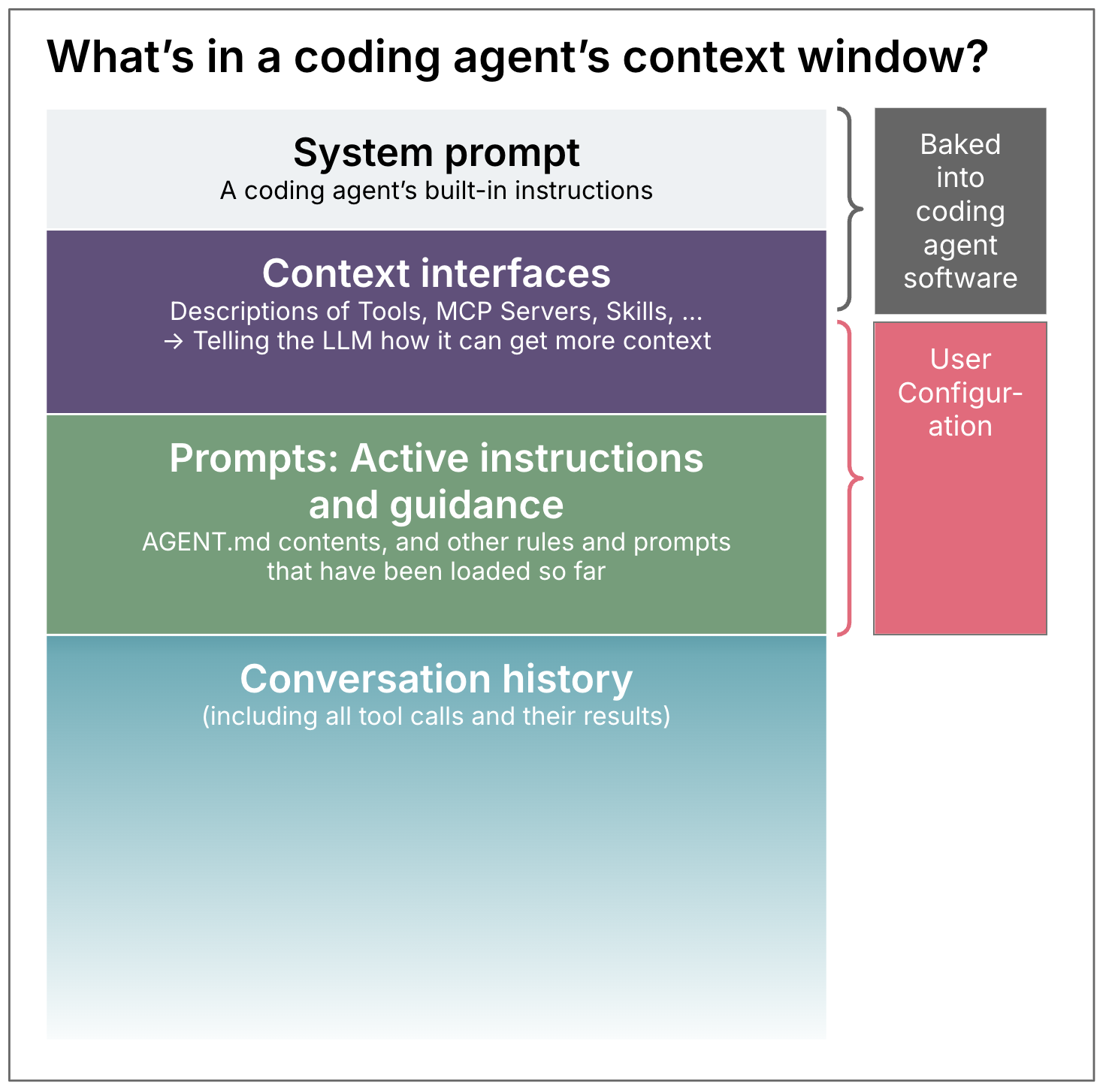
Files in your workspace
The most basic and powerful context interfaces in coding agents are file reading and searching, to understand your
If and when: Who decides to load context?
-
LLM: Allowing the LLM to decide when to load context is a prerequisite for running agents in an unsupervised way. But there always remains some uncertainty (dare I say non-determinism) if the LLM will actually load the context when we would expect it to. Example: Skills
-
Human: A human invocation of context gives us control, but reduces the level of automation overall. Example: Slash commands
-
Agent software: Some context features are triggered by the agent software itself, at deterministic points in time. Example: Claude Code hooks
How much: Keeping the context as small as possible
One of the goals of context engineering is to balance the amount of context given – not too little, not too much. Even though context windows have technically gotten really big, that doesn’t mean that it’s a good idea to indiscriminately dump information in there. An agent’s effectiveness goes down when it gets too much context, and too much context is a cost factor as well of course.
Some of this size management is up to the developer: How much context configuration we create, and how much text we put in there. My recommendation would be to build context like rules files up gradually, and not pump too much stuff in there right from the start. The models have gotten quite powerful, so what you might have had to put into the context half a year ago might not even be necessary anymore.
Transparency about how full the context is, and what is taking up how much space, is a crucial feature in the tools to help us navigate this balance.
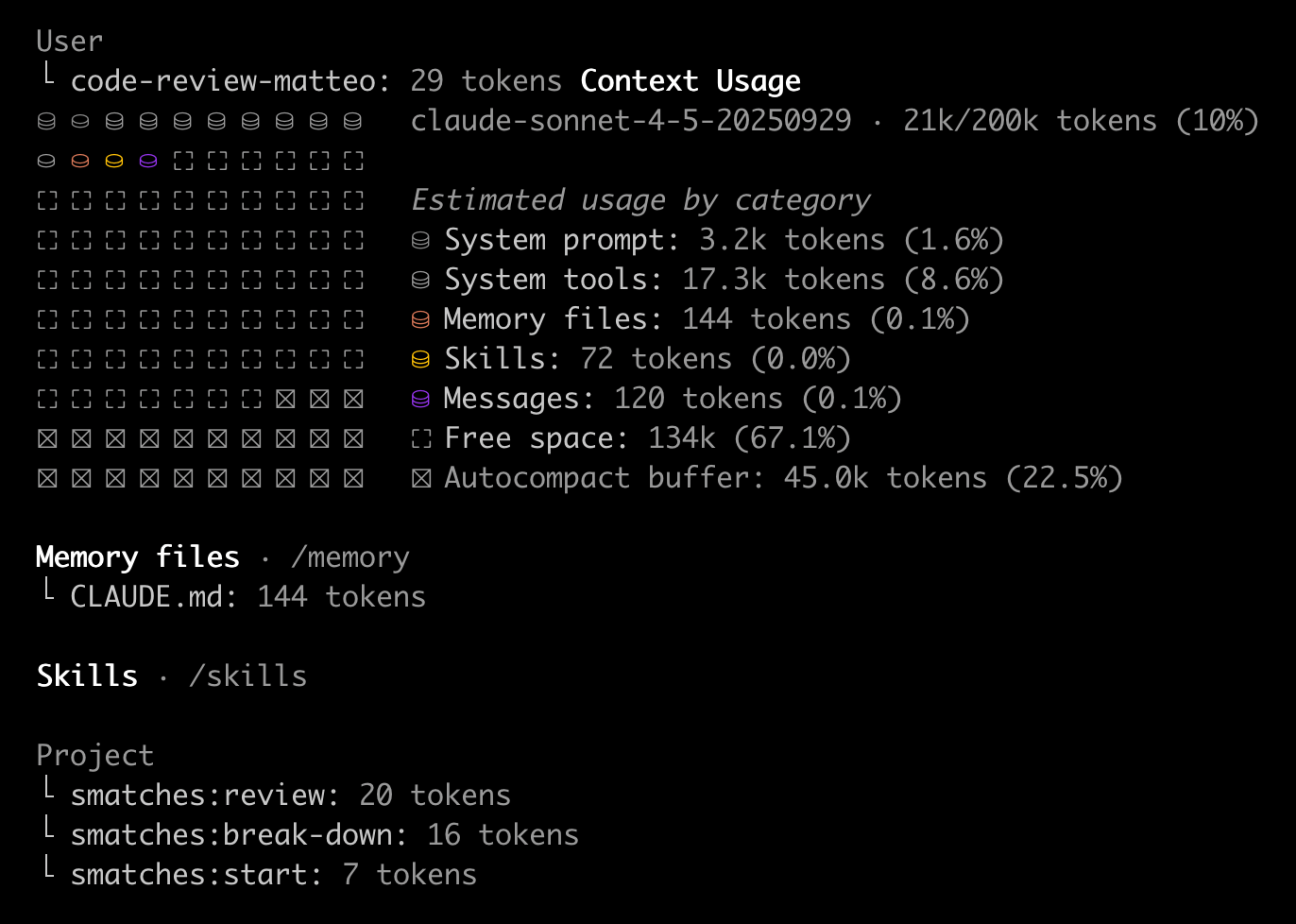
But it’s not all up to us, some coding agent tools are also better at optimising context under the hood than others. They compact the conversation history periodically, or optimise the way tools are represented (like Claude Code’s Tool Search Tool).
Example: Claude Code
Here is an overview of Claude Code’s context configuration features as of January 2026, and where they fall in the dimensions described above:
| What | Who | When to use / things to know | Example use cases | Other coding assistants | |
|---|---|---|---|---|---|
| CLAUDE.md | Guidance | Claude Code – Always used at start of a session | For most frequently repeated general conventions that apply to the whole project | – “we use yarn, not npm” – “don’t forget to activate the virtual environment before running anything” – “when we refactor, we don’t care about backwards compatibility” |
Basically all coding assistants have this feature of a main “rules file”; There are attempts to standardise it as AGENTS.md |
| Rules | Guidance | Claude Code, when files at the configured paths have been loaded | Helps organise and modularise guidance, and therefore limit size of the always loaded CLAUDE.md. Rules can be scoped to files (e.g. *.ts for all TypeScript files), which means they will then only be loaded when relevant. | – “When writing bash scripts, variables should be referred to as ${var} not $var.” paths: **/*.sh | More and more coding assistants allow this path-based rules configuration, e.g. GH Copilot and Cursor |
| Slash commands | Instructions | Human | Common tasks (review, commit, test, …) that you have a specific longer prompt for, and that you want to trigger yourself, inside the main context *DEPRECATED in Claude Code, superceded by Skills* | /code-review/e2e-test/prep-commit |
Common feature, e.g. GH Copilot and Cursor |
| Skills | Guidance, instructions, documentation, scripts, … | LLM (based on skill description) or Human | In its simplest form, this is for guidance or instructions that you only want to “lazy load” when relevant for the task at hand. But you can put whatever additional resources and scripts you want into a skill’s folder, and reference them from the main SKILL.md to be loaded. |
– JIRA access (skill e.g. describes how agent can use CLI to access JIRA) – “Conventions to follow for React components” – “How to integrate the XYZ API” |
Cursor’s “Apply intelligently” rules were always a bit like this, but they’re now also switching to Claude Code style Skills |
| Subagents | Instructions + Configuration of model and set of available tools; Will run in its own context window, can be parallelised | LLM or Human | – Common larger tasks that are suitable for and worth running in their own context for efficiency (to improve results with more intentional context), or to reduce costs). – Tasks for which you usually want to use a model other than your default model – Tasks that need specific tools / MCP servers that you don’t want to always have available in your default context – Orchestratable workflows |
– Create an E2E test for everything that was just built – Code review done by a separate context and with a different model to give you a “second opinion” without the baggage of your original session – subagents are foundational for swarm experiments like claude-flow or Gas Town |
Roo Code has had subagents for quite a while, they call them “modes”; Cursor just got them; GH Copilot allows agent configuration, but they can only be triggered by humans for now |
| MCP Servers | A program that runs on your machine (or on a server) and gives the agent access to data sources and other actions via the Model Context Protocol | LLM | Use when you want to give your agent access to an API, or to a tool running on your machine. Think of it as a script on your machine with lots of options, and those options are exposed to the agent in a structured way. Once LLM decides to call this, the tool call itself is usually a deterministic thing. There is a trend now to supercede some MCP server functionality with skills that describe how to use scripts and CLIs. | – JIRA access (MCP server that can execute API calls to Atlassian) – Browser navigation (e.g. Playwright MCP) – Access to a knowledge base on your machine |
All common coding assistants support MCP servers at this point |
| Hooks | Scripts | Claude Code lifecycle events | When you want something to happen deterministically every single time you edit a file, execute a command, call an MCP server, etc. | – Custom notifications – After every file edit, check if it’s a JS file and if so, then run prettier on it – Claude Code observability use cases, like logging all executed commands somewhere |
Hooks are a feature that is still quite rare. Cursor has just started supporting them. |
| Plugins | A way to distribute all or any of these things | Distribute a common set of commands, skills and hooks to teams in an organisation |
This seems like a lot – however, we’re in a “storming” phase right now and will certainly converge on a simpler set of features. I expect e.g. Skills to not only absorb slash commands, but also rules, which would reduce this table by two rows.
Sharing context configurations
As I said in the beginning, these features are just the foundation for humans to do the actual work and filling these with reasonable context. It takes quite a bit of time to build up a good setup, because you have to use a configuration for a while to be able to say if it’s working well or not – there are no unit tests for context engineering. Therefore, people are keen to share good setups with each other.
Challenges for sharing:
- The context of the sharer and the receiver has to be as similar as possible – it works a lot better inside of a team than between strangers on the internet
- There is a tendency to overengineer the context with unnecessary, copied & pasted instructions up front, in my experience it’s best to build this up iteratively
- Different experience levels might need different rules and instructions
- If you have low awareness of what’s in your context because you copied a lot from a stranger, you might inadvertently repeat instructions or contradict existing ones, or blame the poor coding agent for being useless when it’s just following your instructions
Beware: Illusion of control
In spite of the name, ultimately this is not really engineering… Once the agent gets all these instructions and guidance, execution still depends on how well the LLM interprets them! Context engineering can definitely make a coding agent more effective and increase the probability of useful results quite a bit. However, sometimes people talk about these features with phrases like “ensure it does X”, or “prevent hallucinations”. But as long as LLMs are involved, we can never be certain of anything, we still need to think in probabilities and choose the right level of human oversight for the job.





