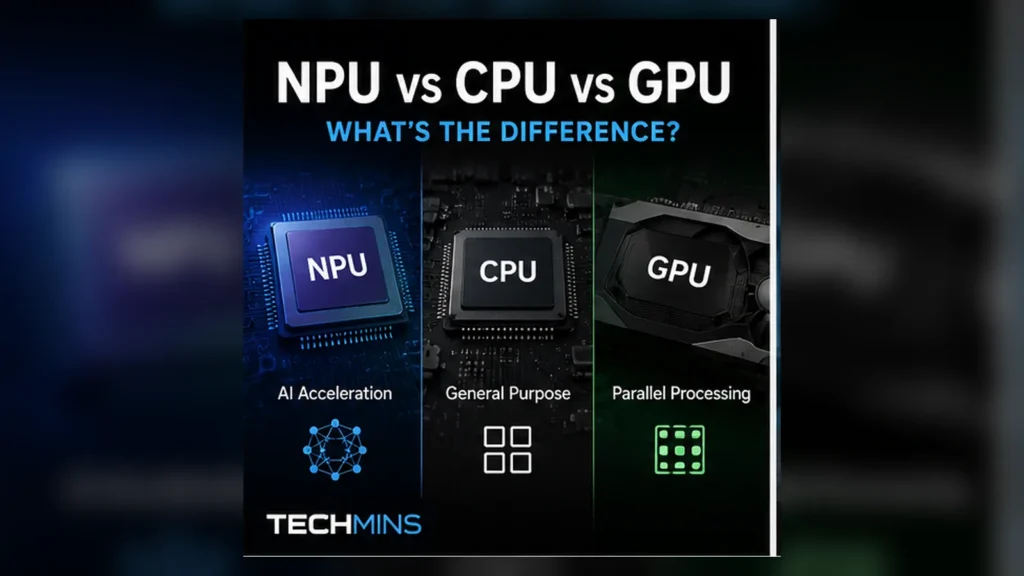
Modern PCs increasingly advertise all three because no single processor is ideal for every workload. The useful question is not “Which one is fastest?” but “Which one is best matched to this job?”
- CPU = flexible, low-latency general-purpose computing.
- GPU = massive parallel throughput and graphics.
- NPU = efficient sustained AI inference for supported models.
- AI software may use one, two or all three engines depending on the task.
- TOPS numbers are not directly comparable across architectures without context.
CPU: the general-purpose coordinator
The Central Processing Unit remains the main general-purpose processor in a PC. It runs operating-system logic, application code, drivers and workloads with complex branching or serial dependencies.
Modern CPUs have multiple cores and vector instructions, so they can absolutely run AI workloads. The issue is efficiency: a sustained neural-network inference task may consume more power or occupy resources that are better used for the rest of the application.
CPU strengths
- Complex branching and decision logic
- Low-latency general application work
- Operating-system and background tasks
- Workloads that do not parallelize efficiently
- Broad software compatibility
GPU: high-throughput parallel compute
GPUs were designed to process many similar operations in parallel for graphics. That same structure maps well to matrix-heavy compute, which is why GPUs became central to modern machine learning.
A powerful discrete GPU can run large AI models far faster than a small integrated NPU in many workloads. But performance comes with higher power consumption, heat and cost. In a laptop running background AI features all day, maximum throughput is not always the primary goal.
GPU strengths
- 3D rendering and graphics
- Massively parallel compute
- Large local AI models and creative workloads
- High-performance training/inference where software support exists
- Video/image processing acceleration
NPU: purpose-built efficiency for neural networks
A Neural Processing Unit is a dedicated accelerator for neural-network operations. Microsoft describes NPUs as specialized hardware that processes AI workloads in parallel while using less power than general-purpose alternatives for suitable tasks.
In an AI PC, the NPU is valuable because it can run supported background inference — such as camera effects, audio enhancement or other on-device AI — without keeping the GPU fully active.
NPU strengths
- Low-power sustained AI inference
- Always-on or frequently used AI effects
- Freeing CPU/GPU resources for other work
- On-device workloads where efficiency and battery life matter
Side-by-side
| Characteristic | CPU | GPU | NPU |
|---|---|---|---|
| Main role | General-purpose compute | Parallel graphics/compute | Neural-network acceleration |
| Flexibility | Highest | High for parallel workloads | More specialized |
| Peak AI throughput | Usually lowest | Often highest in powerful systems | Optimized for efficiency |
| Power efficiency for supported AI | Lower | Varies | Often strongest |
| Graphics rendering | Limited | Primary strength | No |
| Background AI | Possible | Possible | Core use case |
Why an AI PC uses all three
Intel describes modern AI PCs as using CPU, GPU and NPU as complementary “AI engines.” Software can place each piece of a workload on the engine that best balances latency, throughput and power.
For example, an app might use the CPU for interface logic, the NPU for a continuous background model and the GPU for a short burst of image generation.
What TOPS actually tells you
TOPS means trillions of operations per second, usually referring to a specific low-precision arithmetic format and workload class. It is useful for understanding an accelerator’s theoretical capability, but it is not a universal speed score.
NPU vs GPU for local AI
If you want to run a large local language model or image generator at maximum throughput, a capable discrete GPU is usually the more important resource because it combines substantial parallel compute with large high-bandwidth memory.
If you want an efficient always-on transcription, camera effect or supported Windows AI feature on a thin laptop, the NPU can be the better engine because it is designed to do that work with less power.
Does an NPU replace a GPU?
No. An NPU does not replace the GPU for graphics, gaming, 3D rendering or high-performance general compute. The processors overlap in AI capability but are optimized for different parts of the performance/power envelope.
Does an NPU make every AI app faster?
No. The application must support a runtime that can target the NPU, and the model’s operators need to map efficiently to the hardware. Unsupported software may continue using the CPU or GPU even on a PC with a powerful NPU.
What Copilot+ PCs changed
Microsoft’s Copilot+ PC platform made NPU capability much more visible by tying Windows on-device AI features to dedicated acceleration requirements. Windows now contains AI components designed to execute locally on compatible hardware, including the NPU.
That does not mean every “AI PC” experience is the same. Platform requirements, chip generation and available applications continue to evolve.
When an NPU matters to a buyer
- You use a laptop and care about battery-efficient on-device AI.
- You want Windows features or applications that explicitly require/accelerate on an NPU.
- You use video conferencing effects or continuous AI processing frequently.
- You plan to keep the machine for several years as NPU-aware software grows.
When the GPU matters more
- Gaming
- 3D rendering
- Large local generative-AI workloads
- GPU-accelerated creative applications
- Model training or high-throughput compute
When CPU performance still matters most
Everyday responsiveness, application logic, development tools, spreadsheets, browser workloads and many professional applications remain heavily dependent on CPU performance. Buying a machine with a big NPU number but weak CPU performance can still produce a poor general computing experience.
A practical buying rule
Choose the whole system for your workload. For a thin productivity laptop, balanced CPU performance plus an efficient NPU may matter more than a large discrete GPU. For gaming or creative AI, GPU capability remains central. For general-purpose desktops, CPU performance and memory capacity may dominate.
Memory is part of AI performance
Compute engines do not work in isolation. Large AI models need memory capacity and bandwidth. A discrete GPU may have dedicated VRAM, while integrated GPUs and NPUs often share system memory. A machine with a fast accelerator but insufficient RAM can still struggle with local models.
Inference vs training
Most consumer NPU marketing is about inference: running an already-trained model efficiently. Training a large model is a much heavier workload and remains dominated by powerful GPUs and specialized data-center accelerators. When a laptop advertises NPU TOPS, do not interpret that as a training-performance claim.
Precision changes the headline number
AI accelerators can execute calculations at several numeric precisions. Lower precision can dramatically increase throughput for models that tolerate it. This is one reason raw TOPS numbers need context: the precision used for the quoted figure matters.
Software routing is the hidden part of the experience
The operating system, driver and AI runtime decide whether an application can place a model on the NPU. Developers may also split a pipeline: preprocessing on the CPU, neural inference on the NPU and rendering on the GPU. Better scheduling can improve responsiveness without any hardware change.
How to evaluate an AI PC beyond TOPS
- CPU performance for your normal applications
- GPU capability for gaming/creative/local AI workloads
- NPU capability and actual software support
- RAM capacity and memory bandwidth
- Battery life and cooling
- Whether the applications you use can target the NPU today