
Gemini got it! It looked at these images and correctly inferred that cups 1 and 3 are being swapped. And it reasoned correctly about how to update the ball position. Let’s ask:
Not only did Gemini get the answer correctly, it accurately summarized the game history. Of course, it won’t always get this challenge right. Sometimes the fake out move (where you swap two empty cups) seems to trip it up, but sometimes it gets that too. But simple prompts like this make it really fun to rapidly test Gemini. You can change the variables in your prompt, including the order of swaps, and see how it does.
🔨 Tool use
If you want to use Gemini in your own apps, you’ll want it to be able to connect to other tools. Let’s try a simple idea where Gemini needs to combine multimodality with tool use: drawing a picture to search for music.

Nice! Gemini both reasons about what it sees and then generates a search query you can parse to do a search. It’s like Gemini is acting like a translator for you – but instead of translating between languages, it’s translating modalities – from drawing to music in this case. With multimodal prompting, you can use Gemini to invent your own entirely new translations between different inputs and outputs.
🕹️Game creation
What if we tried using Gemini to quickly prototype a multimodal game? Here’s an idea: a geography guessing game where you have to point at a map to make your guess. Let’s start by prompting Gemini with the core idea:
Next, let’s give Gemini an example turn of gameplay, showing it how we want it to handle both incorrect and correct answers:
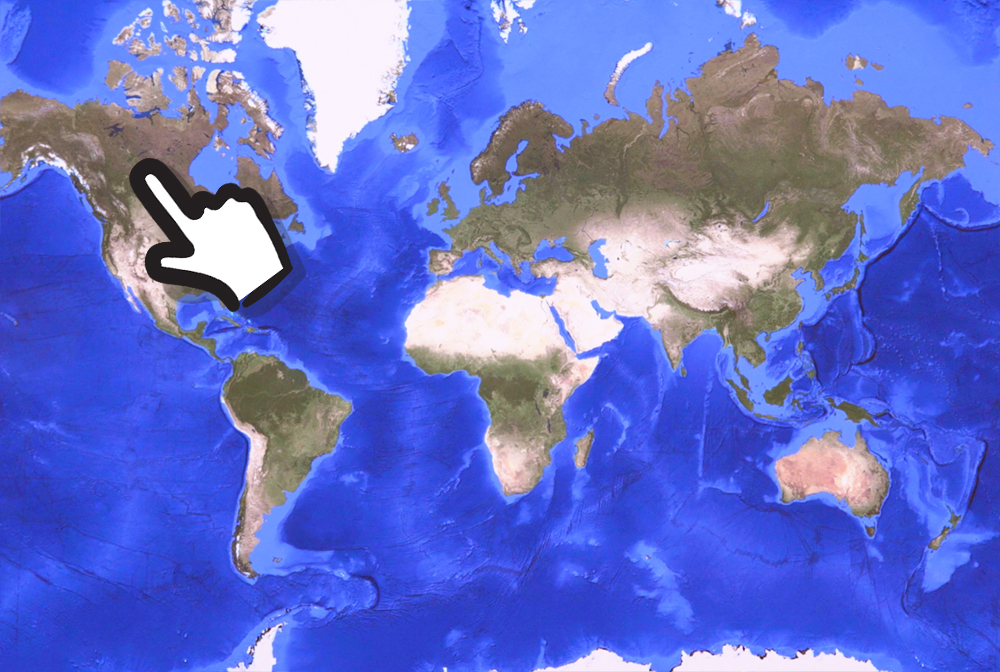

Let’s give it a go and prompt Gemini to generate a clue:
Ok, that’s a good clue. Let’s test out whether pointing will work. Just for fun, let’s try pointing at the wrong place first:

Great! Gemini looked at my image and figured out I’m pointing at Brazil, and correctly reasoned that’s wrong. Now let’s point at the right place on the map:

Nice! We’ve basically taught Gemini our game logic just by giving it an example. You’ll also notice that it generalized from the illustrated hand in the examples.
⌨️ Coding
Of course, to bring your game idea to life, you’ll eventually have to write some executable code. Let’s see if Gemini can make a simple countdown timer for a game, but with a few fun twists:
With just this single instruction, Gemini gives us a working timer that does what we asked for:

My favorite part is scrolling through Gemini’s source code to find the array of motivational emojis it picked for me:
const emojis = ['🚀', '⚡️', '🎉', '🎊', '🥳', '🤩', '✨'];
👀 A sneak peek
Throughout this post, we’ve been giving Gemini an input, and having Gemini make predictions for what might come next. That’s basically what prompting is. And our inputs have been multimodal – image and text, combined.
But so far we’ve only shown Gemini responding in text. Maybe you’re wondering, can Gemini also respond with a combination of image and text? It can! This is a capability of Gemini called “interleaved text and image generation.” While this feature won’t be ready in the first version of Gemini for people to try, we hope to roll it out soon. Here’s a sneak peek of what’s possible.
Let’s see if we could use Gemini to provide everyday creative inspiration. And let’s try it in a domain that requires a bit of multimodal reasoning … knitting! 🧶. Similar to our map game above, let’s provide one example turn of interaction:


We’re essentially teaching Gemini about how we want each interaction to go: “I’ll take a photo of two balls of yarn, and I expect you (Gemini) to both come up with an idea for something I could make, and generate an image of it.”
Now, let’s show it a new pair of yarn colors it hasn’t yet seen, and see if it can generalize:

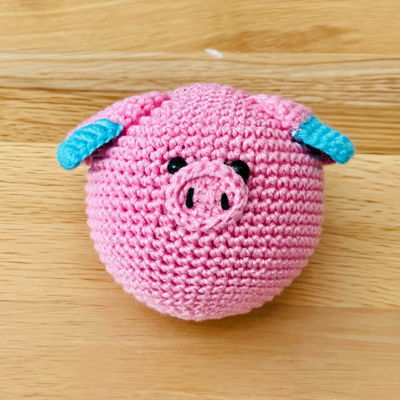

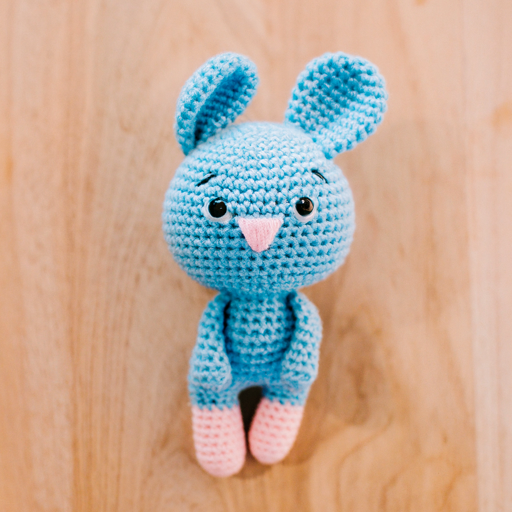
Nice! Gemini correctly reasoned about the new colors (“I see blue and pink yarn”) and generated these ideas and the images in a single, interleaved output of text and image.
What Gemini did here is fundamentally different from today’s text-to-image models. It’s not just passing an instruction to a separate text-to-image model. It sees the image of my actual yarn on my wooden table, truly doing multimodal reasoning about my text and image together.
What’s Next?
We hope you found this a helpful starter guide to get a sense of what’s possible with Gemini. We’re very excited to roll it out to more people soon so you can explore your own ideas through prompting. Stay tuned!




