
An operating system (OS) manages all other applications and programs in a computer, and it is loaded into the computer by a boot program. It enables applications to interact with a computer’s hardware. Through a designated application programme interface, the application programmes request services from the operating system (API). The kernel is the software that contains the operating system’s core components. To run other programmes, every computer has to have at least one operating system installed.

Windows, Linux, and Android are examples of operating systems that enable the user to use programs like MS Office, Notepad, and games on the computer or mobile phone. It is necessary to have at least one operating system installed in the computer to run basic programs like browsers.
Functions of Operating System
The functions of an operating system (OS) are diverse and crucial for the efficient operation of a computer system. These functions include:
- Memory Management: The OS manages the main memory, allocating and deallocating it as necessary for various processes. It ensures that different processes can coexist in memory without interfering with each other.
- Processor Management/Scheduling: This involves managing the CPU’s time and resources among the various processes. The OS selects which processes receive CPU time and ensures efficient and fair use of the processor.
- Device Management: The OS regulates the connection and interaction with various input and output devices through device drivers. It allocates and deallocates devices to different processes and keeps track of device statuses.
- File Management: The OS manages files on a computer, handling tasks like creation, deletion, transfer, and storage. It also maintains the integrity and security of the data within these files.
- Storage Management: The OS is responsible for storing and accessing files and directories, optimizing the use of various storage devices, and ensuring data integrity and efficient retrieval.
- Security: Modern OSs employ security measures like firewalls to protect against unauthorized access and intrusion. They monitor system activity and block potential threats.
- Job Accounting and System Performance Control: The OS keeps track of all system activities, including memory, resource usage, and errors. It also monitors performance indicators to ensure efficient operation.
- Error Detection: The OS continually checks for system errors and threats, protecting the system from potential damage and alerting users to take appropriate action.
- Coordination Between Software and Users: It coordinates hardware components and directs various software applications, ensuring smooth operation and user interaction.
In addition to the traditional functions of an operating system (OS), there are several advanced and evolving functions that modern OSs are increasingly incorporating:
- Virtualization Support: Modern OSs often include support for virtualization, allowing multiple virtual machines to run on a single physical machine. This facilitates efficient resource utilization and isolation of different computing environments.
- Cloud Integration: Many operating systems now offer built-in cloud integration, enabling seamless access to cloud storage and services, and facilitating data synchronization and backup across devices.
- Energy Management: With the growing use of mobile devices, OSs are increasingly focused on energy management to extend battery life. This includes optimizing the use of hardware resources and managing background processes.
- Advanced Security Features: Modern OSs are equipped with advanced security features such as biometric authentication, encryption, advanced firewall and anti-malware systems, and continuous security updates to protect against emerging threats.
- Automated Updates and Maintenance: OSs now often include automated system updates and maintenance features, ensuring that the system stays up to date with the latest features and security patches without requiring manual intervention.
- IoT Support: With the proliferation of Internet of Things (IoT) devices, operating systems are being designed to support IoT applications, including managing and interacting with a vast array of sensors and smart devices.
- AI and Machine Learning Integration: Incorporating AI and machine learning algorithms for predictive analytics, personalization, and enhanced user interaction is becoming a key feature in modern operating systems.
These additional functionalities reflect the evolving nature of operating systems as they adapt to new technological advancements and user needs.

Features of Operating Systems
Here is a list of some important features of operating systems:
- Provides a platform for running applications
- Handles memory management and CPU scheduling
- Provides file system abstraction
- Provides networking support
- Provides security features
- Provides user interface
- Provides utilities and system services
- Supports application development
Advantages of Operating System
There are several advantages of operating systems. We have listed some of them below:
- Ensuring correct and efficient use of the computer’s hardware.
- Allowing different applications to run concurrently.
- Managing files and folders.
- Providing a user interface.
- Managing security.
- Managing resources.
- Managing printing.
- Providing a platform for software development.
Disadvantages of Operating System
There are several disadvantages of operating systems. We have listed some of them below:
- They can be complex and difficult to use.
- They can be expensive to purchase and maintain.
- They can be vulnerable to attacks from malicious users.
Types of Operating Systems
The types of operating systems (OS) have evolved significantly, adapting to technological advancements and changing user needs. Here’s a summary of various types of operating systems:
- Batch OS: Traditionally used for executing a series of jobs without manual intervention. While still relevant in specific contexts, modern computing has largely moved beyond batch processing due to the rise of more interactive and real-time systems.
- Distributed OS: These systems manage a network of interconnected computers, distributing the workload among them. They are becoming increasingly relevant with the rise of cloud computing and edge computing. Distributed systems are critical for handling large-scale, distributed applications efficiently.
- Multitasking OS: These systems, capable of running multiple tasks simultaneously, continue to evolve. Modern multitasking OSs are more efficient at resource allocation, ensuring smoother operation even with numerous applications running.
- Network OS: These are designed to manage networked computers, providing shared access to resources like files and printers. With the proliferation of cloud services, network operating systems are increasingly integrating cloud functionalities for enhanced connectivity and resource sharing.
- Real-Time OS (RTOS): RTOSs are crucial in scenarios where time-critical operations are necessary, such as in embedded systems, robotics, and IoT devices. They ensure timely processing and responses, a key requirement in autonomous systems and industrial automation.
- Mobile OS: Mobile operating systems have seen significant advancements, particularly in terms of integration with cloud services, security features, and user interface enhancements. The focus has shifted towards seamless synchronization across devices and platforms, providing a consistent user experience.
- IoT Integration: Modern operating systems are evolving to better manage and integrate with a growing number of IoT devices. They are becoming central in controlling and monitoring these devices, offering unified interfaces for diverse smart devices.
- AR/VR Support: There’s an increased focus on supporting augmented reality (AR) and virtual reality (VR) technologies. Future operating systems are expected to offer optimized environments for AR/VR applications, with advanced capabilities in graphics rendering, motion tracking, and spatial audio.
- Enhanced Security and Privacy: With digital threats becoming more sophisticated, operating systems are emphasizing stronger security measures and privacy controls. This includes advanced encryption techniques, secure boot processes, and user-centric privacy features.
- Cross-Platform Compatibility: The trend is towards operating systems that provide seamless integration and compatibility across various devices and platforms. This includes cloud storage integration and universal app frameworks for a consistent multi-device experience.
- Edge Computing and Distributed Systems: As computing extends beyond traditional data centers, operating systems are adapting to manage resources in distributed architectures, including edge computing scenarios. This trend is geared towards faster and more responsive applications.
- Machine Learning and Predictive Capabilities: Operating systems are increasingly leveraging machine learning for predictive analytics and optimization. This includes intelligent power management and personalized user experiences.
Batch OS
Batch Operating Systems are a type of system software that manages the execution of jobs (programs) in a batch, without manual intervention. Here are the details, advantages, and disadvantages of Batch Operating Systems:
Details:
- Functionality: Batch OSs are designed to handle jobs automatically and sequentially. They queue a series of jobs and process them one after the other.
- Historical Context: These systems were prevalent during the early days of computing when interactive user interfaces were not yet developed.
- Execution Model: Jobs are collected in a batch and processed without user interaction, typically reading from inputs like punched cards or tapes.
- Automation: A significant feature of batch systems is their ability to schedule and process jobs without human intervention once the batch is initiated.
Advantages:
- Efficient for Large Volumes of Data: Batch systems are highly efficient for processing large volumes of data where immediate user interaction is not required.
- Resource Optimization: By processing jobs sequentially, these systems can optimize the use of system resources, reducing idle times for the processor.
- Automation: Batch OSs can automate repetitive tasks, thereby reducing the need for human intervention and minimizing errors.
- Cost-Effective: Suitable for tasks that aren’t time-sensitive, offering a cost-effective solution for large-scale data processing tasks.
Disadvantages:
- Lack of Interaction: Users cannot interact with their jobs while processing, leading to a lack of control and flexibility.
- Delay in Processing: If a job in the batch encounters an issue, it can delay the processing of subsequent jobs, leading to inefficiency.
- Limited Flexibility: Batch systems are not suitable for tasks requiring immediate processing or interactive tasks like multimedia applications.
- Resource Intensive: These systems might require significant resources when handling large batches, which could be a drawback for smaller operations.
Modern Context:
- While batch processing is less common in interactive user environments today, it remains relevant in specific contexts like data processing for research, financial batch transactions, and backend processing in various industries.
- The rise of more interactive and real-time systems has reduced the prevalence of traditional batch OSs, but their principles are still applied in modern batch processing tasks, often within more advanced operating systems or specialized software environments.
- Batch operating systems played a crucial role in the evolution of computing and continue to be relevant in specific scenarios where automated, sequential processing of large data sets is required.
Examples of Batch OS Usage:
- Payroll Systems: Many businesses use batch processing to handle payroll tasks. They process all employee payments at once at a scheduled time, typically at the end of a pay period.
- Bank Transactions: Banks often process transactions in batches during off-peak hours. This includes processing checks, updating accounts, and reconciling balances.
- Data Processing for Research: Large datasets, such as those used in scientific research, are often processed in batches to analyze and compile results.
- Report Generation: Generating reports from collected data, such as sales reports or inventory levels, is typically done in batch mode.
Distributed OS
Distributed Operating Systems (DOS) are a network of independent computers that work together and present themselves as a coherent system to the user. Here are the details, advantages, disadvantages, and examples:
Details:
- Functionality: Distributed OS manages a collection of independent computers and makes them appear to the user as a single coherent system.
- Resource Sharing: It enables sharing of resources like processors, memory, data, etc., across different machines in the network.
- Communication: DOS relies on communication protocols for the interaction between different nodes in the system.
Advantages:
- Fault Tolerance: The failure of one system does not affect the others, ensuring higher reliability and continuous operation.
- Reduced Load on Host System: Workload is distributed across multiple systems, reducing the burden on a single host system.
- Scalability: Systems can be easily added or removed from the network, providing flexibility in scaling resources up or down as needed.
- Performance Enhancement: Distributed computing allows for faster processing as tasks are parallelized across multiple nodes.
- Faster Data Exchange: Communication technologies like electronic mail facilitate quick data exchange between nodes.
Disadvantages:
- High Setup Cost: Establishing a distributed environment can be expensive due to the need for multiple systems and robust network infrastructure.
- Complexity: The software for managing distributed systems is often complex, requiring specialized skills for setup and maintenance.
- Network Dependency: The entire system can become vulnerable if the main network fails, leading to potential system-wide disruptions.
Examples:
- LOCUS: An early example of a distributed operating system that provided transparent access to data and resources across a network of computers.
- Apache Hadoop: Widely used in big data applications, it’s a framework that allows for distributed processing of large data sets across clusters of computers.
- Google’s File System (GFS): A scalable distributed file system used to manage data across large clusters of machines.
- Distributed Computing Environments (DCEs): Used in enterprise settings for sharing computing resources and services across networked computers.
Multitasking OS
Multitasking Operating Systems (OS) are designed to execute multiple tasks or processes simultaneously. Here are the details, advantages, disadvantages, and examples of Multitasking OS:
Details:
- Functionality: In a multitasking OS, multiple tasks are executed by the processor in a way that gives the impression that all tasks are running simultaneously.
- Time-Sharing: This system is often referred to as a time-sharing system because each task is given a certain time slice (quantum) for execution. After its time slice expires, the task is switched out for another.
- User Access: It provides the ability for multiple users to use the system resources efficiently, as if each user has their own processor.
Advantages:
- Efficient CPU Utilization: Multitasking OS minimizes CPU idle time, ensuring that the processor is used efficiently.
- Equal Time Allocation: Each task is given an equal amount of time for execution, which helps in fair processing of all tasks.
- Reduced Software Duplication: The ability to run multiple applications simultaneously reduces the need for duplicate software installations.
Disadvantages:
- Equal Priority to Processes: It may not prioritize processes effectively; urgent tasks might not get immediate attention if all processes are given equal priority.
- Security Concerns: Managing user data securely becomes more complex as various processes may require different levels of access and authorization.
- Data Communication Issues: In a system with many tasks running concurrently, there can be challenges in data communication and synchronization between processes.
Examples:
- UNIX: Known for its robust multitasking capabilities, UNIX allows for efficient execution of multiple processes simultaneously.
- Linux: Like UNIX, Linux supports multitasking and is widely used in various environments for its efficiency in handling multiple tasks.
- Microsoft Windows: Windows operating systems support multitasking, allowing users to run multiple applications at the same time.
- macOS: Apple’s macOS is designed for efficient multitasking, seamlessly managing multiple applications.
Network OS
Network operating systems are the systems that run on a server and manage all the networking functions. They allow sharing of various files, applications, printers, security, and other networking functions over a small network of computers like LAN or any other private network.
Network Operating Systems (NOS) are designed to manage and facilitate communication and resource sharing in networks, particularly in settings like Local Area Networks (LANs) or larger network configurations. Here are the details, advantages, disadvantages, and examples of Network OS:
Details:
- Functionality: Network OS manages network resources such as files, printers, users, groups, security, and applications.
- Server-Based: They typically run on servers and provide shared access to resources.
- User Awareness: Network OS allows all users on the network to be aware of each other’s configurations and resources, making it a tightly coupled system.
- Application: Widely used in business environments where multiple computers are networked together.
Advantages:
- Ease of Upgrading: New technologies and hardware upgrades can be implemented more easily on the server.
- Centralized Security Management: Security is managed over the server, which can be more efficient and robust compared to individual security management on each client machine.
- Remote Access: Servers and resources can be accessed remotely, facilitating flexibility and connectivity for users in different locations.
- Stable Centralized Servers: Centralized servers tend to be more stable and reliable, providing consistent network services.
Disadvantages:
- High Cost of Servers: Setting up and maintaining servers can be expensive, requiring significant investment.
- Need for Regular Updates and Maintenance: Network OS often requires regular updates and maintenance, which can be resource-intensive.
- Dependency on Central Location: Users are often dependent on the central server for many operations, which can be a bottleneck and a single point of failure.
Examples:
- Microsoft Windows Server: A series of enterprise-class server operating systems designed to handle corporate networking, Internet/intranet hosting, databases, and other similar functions.
- Linux-based Servers: Various distributions of Linux are used as server operating systems in network environments due to their stability and scalability.
- Novell NetWare: An older example of a network operating system that was widely used in corporate environments for file and print sharing and other network services.
- Unix: Known for its powerful networking capabilities, Unix is used in environments where robust networking services are required.
Real-Time OS
Real-Time Operating Systems (RTOS) are designed to process data and execute tasks within strict time constraints, ensuring timely responses in critical systems. Here are the details, advantages, disadvantages, and examples:
Details:
- Functionality: RTOSs are used in environments where time-critical operations are necessary. They ensure that tasks are completed within a predefined time limit.
- Types of RTOS:
- Hard Real-Time OS: In these systems, missing a deadline is considered a critical failure. They are used in life-critical applications like medical systems and airbag control systems in vehicles.
- Soft Real-Time OS: These systems can tolerate some delays in execution. They prioritize critical tasks but allow for slight delays in less critical processes. Examples include multimedia systems and virtual reality.
Advantages:
- Predictability: RTOSs offer predictable and consistent behavior in task execution.
- Efficient Resource Utilization: They maximize the utilization of system resources, ensuring optimal performance.
- Error-Free Operation: RTOSs are designed to be robust and error-free, crucial in critical applications.
- Quick Context Switching: They can quickly switch between tasks, minimizing transition time and maximizing efficiency.
- Effective Memory Management: RTOSs are efficient in managing memory allocation and deallocation, crucial for real-time applications.
Disadvantages:
- High Cost: The systems and resources required for RTOSs are often expensive.
- Complex Algorithms: The algorithms used in RTOSs for scheduling and managing tasks are complex.
- Limited Task Execution: They typically handle a limited number of tasks simultaneously due to strict time constraints.
- Priority Handling: In some RTOSs, setting thread priority and managing task switching can be challenging.
Examples:
- Medical Imaging Systems: RTOSs are used in medical imaging devices like MRI and CT scanners, where precise timing is crucial.
- Industrial Robots: In robotic manufacturing systems, RTOSs ensure tasks are completed in a precise and timely manner.
- Automotive Systems: Used in car control systems, like braking and airbag deployment, where delays are unacceptable.
- Aerospace: RTOSs are used in flight control systems of aircraft and spacecraft.
Mobile OS
Mobile Operating Systems (OS) are specifically designed for handheld devices such as smartphones, tablets, and personal digital assistants (PDAs). Here are the details, advantages, disadvantages, and examples:
Details:
- Functionality: Mobile OSs provide a platform for mobile applications, managing hardware components like touchscreens, GPS, Bluetooth, and cameras. They are optimized for wireless communication and mobile computing tasks.
- User Interface: Designed with touch-based interfaces and smaller screen sizes in mind, offering a user-friendly experience tailored to handheld devices.
- App Ecosystem: Supports a wide range of mobile applications available through app stores, catering to various user needs.
Advantages:
- User Convenience: Mobile OSs are designed for ease of use, with intuitive interfaces and touch-screen functionality.
- Connectivity: They offer robust connectivity options including cellular data, Wi-Fi, Bluetooth, and NFC.
- Portability: Optimized for low power consumption and efficient performance on portable devices.
- Versatility: Supports a wide range of applications, from basic utilities to advanced gaming and professional tools.
Disadvantages:
- Battery Life: Some mobile OSs can be demanding on battery life, especially with extensive usage or when running resource-intensive apps.
- User Experience Variability: The user experience can vary significantly across different devices and versions of the same OS.
- Security Concerns: Mobile OSs are often targeted by malware and security threats, necessitating regular updates and security measures.
Examples:
- Android OS: Developed by Google, Android is a widely used mobile OS known for its customizability and wide range of compatible apps.
- iOS: Apple’s mobile OS for iPhone and iPad, known for its smooth user interface and robust security features.
- Symbian OS: Once a popular mobile OS for Nokia smartphones, known for its efficiency and multitasking capabilities.
- Windows Mobile OS: Developed by Microsoft, it was used in smartphones and PDAs, offering integration with Windows services.
Single-tasking vs. multi-tasking operating systems: Single-tasking operating systems allow only one program to run at a time, while multi-tasking operating systems allow multiple programs to run simultaneously.
Desktop vs. mobile operating systems: Desktop operating systems, such as Windows and macOS, are designed for use on desktop and laptop computers, while mobile operating systems, such as iOS and Android, are designed for use on smartphones and tablets.
Open-source vs. proprietary operating systems: Open-source operating systems are developed by a community of developers and are available for free, while proprietary operating systems are developed by a single company and must be purchased.
Components of Operating System
Shell handles user interactions. It is the outermost layer of the OS and manages the interaction between user and operating system by:
- Prompting the user to give input
- Interpreting the input for the operating system
- Handling the output from the operating system.
Shell provides a way to communicate with the OS by either taking the input from the user or the shell script. A shell script is a sequence of system commands that are stored in a file.
For an in-depth understanding of this topic, check out this free operating system course.
What is Kernel?
The kernel is the core component of an operating system for a computer (OS). All other components of the OS rely on the core to supply them with essential services. It serves as the primary interface between the OS and the hardware and aids in the control of devices, networking, file systems, and process and memory management.
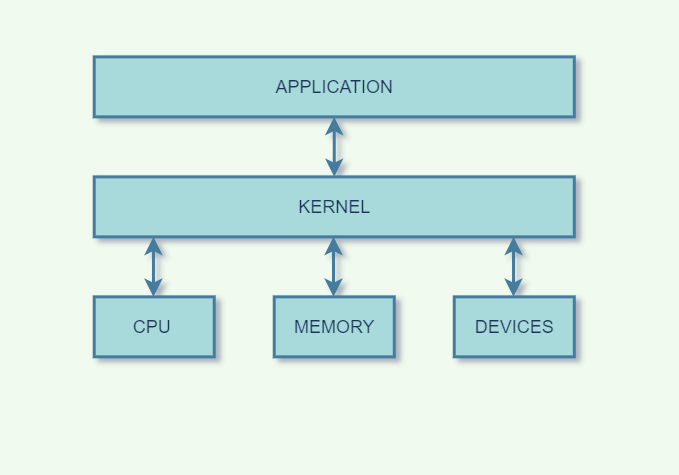
Functions of kernel
The kernel is the core component of an operating system which acts as an interface between applications, and the data is processed at the hardware level.
When an OS is loaded into memory, the kernel is loaded first and remains in memory until the OS is shut down. After that, the kernel provides and manages the computer resources and allows other programs to run and use these resources. The kernel also sets up the memory address space for applications, loads the files with application code into memory, and sets up the execution stack for programs.
The kernel is responsible for performing the following tasks:
- Input-Output management
- Memory Management
- Process Management for application execution.
- Device Management
- System calls control
Earlier, all the basic system services like process and memory management, interrupt handling, etc., were packaged into a single module in the kernel space. This type of kernel was called the Monolithic Kernel. The problem with this approach was that the whole kernel had to be recompiled for even a small change.
In a modern-day approach to monolithic architecture, a microkernel contains different modules like device management, file management, etc. It is dynamically loaded and unloaded. With this modern-day approach, the kernel code size was reduced while its stability increased.
Types of Kernel
Linus Torvalds introduced the concept of a monolithic kernel in 1991 as a part of the Linux kernel. A monolithic kernel is a single large program that contains all operating system components. However, the Linux kernel evolved over the years and now consists of different types of kernels, as listed below.
1. Monolithic Kernel As the name suggests, a monolithic kernel is a single large program that contains all operating system components. The entire kernel executes in the processor’s privileged mode and provides full access to the system’s hardware. Monolithic kernels are faster than microkernels because they don’t have the overhead of message passing. This type of kernel is generally used in embedded systems and real-time operating systems.
2. Microkernel A microkernel is a kernel that contains only the essential components required for the basic functioning of the operating system. All other components are removed from the kernel and implemented as user-space processes. The microkernel approach provides better modularity, flexibility, and extensibility. It is also more stable and secure than monolithic kernels.
3. Hybrid Kernel A hybrid kernel is a kernel that combines the best features of both monolithic kernels and microkernels. It contains a small microkernel that provides the essential components for the basic functioning of the OS. The remaining components are implemented as user-space processes or as loadable kernel modules. This approach provides the best of both worlds, namely, the performance of monolithic kernels and the modularity of microkernels.
4. Exokernel An exokernel is a kernel that provides the bare minimum components required for the basic functioning of the operating system. All other components are removed from the kernel and implemented as user-space processes. The exokernel approach provides the best possible performance because there is no kernel overhead. However, it is also the most difficult to implement and is not widely used.
Now let’s look at the different types of operating systems.
32-bit OS versus 64-bit OS
| Parameter | 32-Bit OS | 64-Bit OS |
| Data and Storage | The 32 bit OS can store and manage less data than the 64 bit OS, as its name would imply. It addresses a maximum of 4,294,967,296 bytes (4 GB) of RAM in more detail. | In contrast, the 64 bit OS has a larger data handling capacity than the 32 bit OS. It indicates that a total of 264 memory addresses, or 18 quintillion gigabytes of RAM, can be addressed. |
| Compatibility of System | A 32-bit processor system will run only on 32-bit OS and not on 64 bit OS. | A 64-bit processor system can run either a 32-bit or 64-bit OS |
| Application Support | The 32-bit OS support applications with no hassle. | The 64-bit OS do not support applications. |
| Performance | Performance of 32- bit OS is less efficient. | Higher performance than the 32-bit processor. |
| Systems Available | These support Windows 7, Windows XP, Windows Vista, Windows 8, and Linux. | These support Windows XP Professional, Windows 7, Windows 8, Windows 10, Windows Vista, Linux, and Mac OS X. |
Popular Operating Systems
Some of the most popular operating systems in use today include:
- Windows: Windows is the most popular desktop operating system, used by over 1 billion users worldwide. It has a wide range of features and applications, including the Office suite, gaming, and productivity tools.
- macOS: macOS is the desktop operating system used by Apple Mac computers. It is known for its clean, user-friendly interface and is popular among creative professionals.
- Linux: Linux is an open-source operating system that is available for free and can be customized to meet specific needs. It is used by developers, businesses, and individuals who prefer an open-source, customizable operating system.
- iOS: iOS is the mobile operating system used by Apple iPhones and iPads. It is known for its user-friendly interface, tight integration with Apple’s hardware and software, and robust security features.
- Android: Android is the most popular mobile operating system, used by over 2 billion users worldwide. It is known for its open-source nature, customization options, and compatibility with a wide range of devices.
Operating Systems Market Share


Choosing the Right Operating System
When choosing an operating system, there are several factors to consider, including:
- Cost: Some operating systems, such as Linux, are free, while others, such as Windows and macOS, must be purchased.
- Compatibility: Some software and hardware may only work with certain operating systems, so choosing an operating system compatible with your needs is important.
- Ease of use: Some operating systems, such as macOS and iOS, are known for their user-friendly interfaces, while others, such as Linux, may have a steeper learning curve.
- Security: Some operating systems, such as macOS and iOS, are known for their robust security features, while others, such as Windows, may be more vulnerable to security threats.
Operating System Generations
Operating systems have evolved over time through different generations, each marked by distinct characteristics and advancements. Let’s explore these generations along with real-time examples:
1. First Generation:
- Time Period: 1940s to early 1950s
- Characteristics: Vacuum tubes and machine language programming.
- Example: ENIAC (Electronic Numerical Integrator and Computer) – One of the earliest computers that used vacuum tubes for calculations.
2. Second Generation:
- Time Period: Late 1950s to mid-1960s
- Characteristics: Transistors and assembly language programming.
- Example: IBM 1401 – Used transistors, enabling faster and more reliable processing than vacuum tubes.
3. Third Generation:
- Time Period: Mid-1960s to mid-1970s
- Characteristics: Integrated circuits (ICs) and high-level programming languages.
- Example: IBM System/360 – Introduced a family of computers using compatible software and peripheral devices.
4. Fourth Generation:
- Time Period: Late 1970s to 1990s
- Characteristics: Microprocessors, personal computers, and graphical user interfaces (GUI).
- Example: Apple Macintosh – Introduced GUI and mouse-driven interface, making computers more user-friendly.
5. Fifth Generation:
- Time Period: 1990s to present (continuing)
- Characteristics: Artificial Intelligence (AI), natural language processing, and parallel processing.
- Example: IBM’s Deep Blue – Defeated world chess champion Garry Kasparov in 1997, showcasing the power of AI in complex decision-making.
6. Sixth Generation (Speculative):
- Characteristics: Advanced AI, quantum computing, brain-computer interfaces.
- Example: Quantum computers being developed by companies like IBM and Google, potentially revolutionizing complex calculations.
7. Future Generations (Hypothetical):
- Characteristics: Even more advanced AI, integration with human cognition, new computing paradigms.
- Example: A future generation could involve computers that seamlessly interface with the human brain, enabling direct thought-based interactions.
These generations demonstrate how operating systems have evolved from basic machine-level instructions to sophisticated systems that can handle complex tasks and interactions with users. Each generation builds upon the achievements of the previous one, incorporating new technologies and capabilities.
Real-Time Operating System
What is RTOS?
An operating system that can execute multi-threaded programmes and adhere to real-time deadlines is known as a “RTOS.” The majority of RTOSes incorporate device drivers, resource management, and schedulers. Remember that we don’t always mean “quick” when we talk about “deadlines.” Instead, this means that we can foresee when specific jobs will run before runtime.
If you’re writing intricate embedded applications, an RTOS can be a great tool. They support task isolation and enable concurrent operation.
Applications of Real-Time Operating System
- Defence application systems like RADAR.
- Airlines reservation system.
- Systems that provide immediate updating.
- Networked Multimedia Systems.
- Air traffic control system.
- Command Control Systems.
Conclusion
As the need for technology grows day by day in the coming days and as younger generations like Gen Alpha grow up & join the workforce good & efficient operating system will be the topmost priority of every business setting. If you are planning to get a degree in IT, now is the best time to start.
Operating System FAQs
An operating system (OS) is the programme that controls all other application programmes in a computer after being installed into the system first by a boot programme. The application programmes seek services from the operating system (API) through a specified application programme interface.
An operating system facilitates communication between a user and a system. Examples of operating systems are Microsoft Office, Notepad, and gaming on a computer or mobile device including Windows, Linux, and Android.
Types of an Operating System are
Batch Operating System.
Time-Sharing Operating System.
Distributed Operating System.
Embedded Operating System.
Real-time Operating System.
The most crucial piece of software that runs on a computer is the operating system. It controls the memory, operations, software, and hardware of the computer. Using this method, you can converse with the computer even if you don’t understand its language.
An operating system is a design that enables user application programmes to communicate with the hardware of the machine. The operating system should be built with the utmost care because it is such a complicated structure and should be simple to use and modify. Partially developing the operating system is a simple approach to accomplish this.
A process is an instance of a computer programme that is being run by one or more threads in computing. It includes the programme code and all of its operations. A process may consist of several concurrently running threads of execution, depending on the operating system (OS).





