
If you’ve ever faced the frustrating issue of your FPV drone refusing to arm, you’re in the right place. I’m here to guide you through troubleshooting and fixing this problem, especially if your drone uses Betaflight firmware. By understanding what prevents a drone from arming and learning how to diagnose and fix these issues, you’ll be back in the air in no time.

New to Betaflight? No worries—here’s a tutorial to get you started on setting it up for the first time: https://oscarliang.com/betaflight-firmware-setup/
The First Things to Check
Alright, let’s dive into the first steps to diagnose why your drone isn’t arming.
Unplugging USB Cable
Betaflight has a safety feature where your motors won’t spin up if the flight controller is connected to the configurator. So, disconnect the USB and give it another go.
Radio Receiver Check
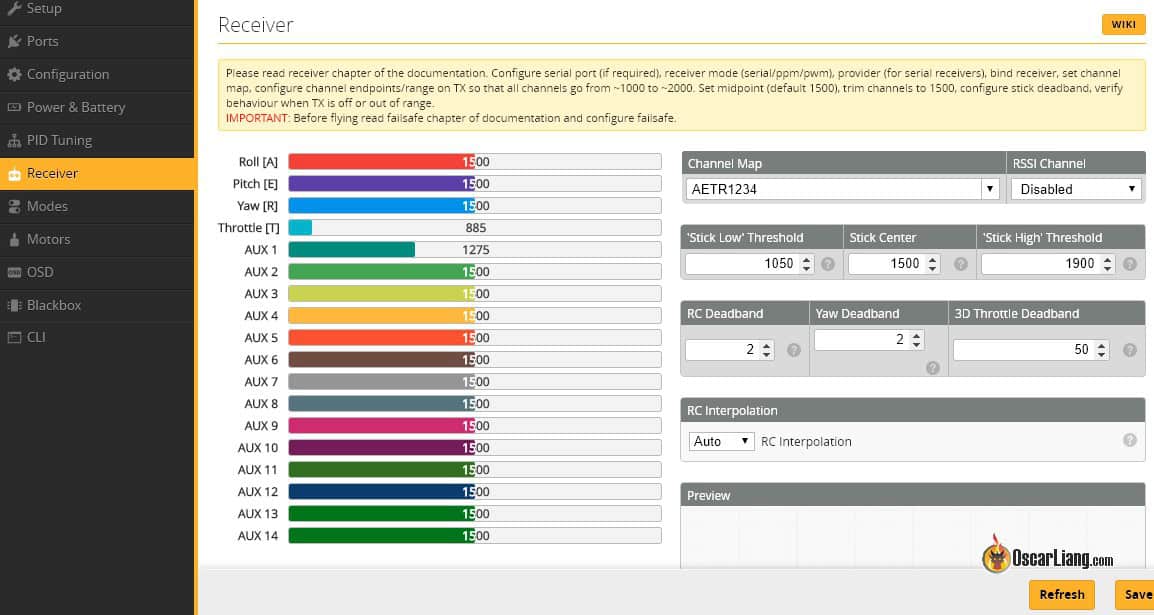
Ensure your radio receiver is bound and working correctly in Betaflight. Head over to the receiver tab to see if the channel responses match your stick movements correctly. Oh, and make sure you’ve got the latest Betaflight configurator downloaded: https://oscarliang.com/download-betaflight-configurator/.
Arm Mode Assignment
Did you assign a switch on your radio for ARM mode? It should light up yellow when activated, signaling everything’s set correctly. Not sure how to do that? See my tutorial on setting up Arm switch: https://oscarliang.com/betaflight-modes/#How-to-Setup-Arm-Switch

Still no luck? Let’s dig a bit deeper.
How to Check for Arming Issues in Betaflight
OSD
If you’ve got Betaflight OSD, enable “Warnings” on your screen with “Arming Disabled” selected. It’ll give you clue on what’s stopping the drone from arming.

You don’t have Betaflight OSD? There are other ways to check for the “Arming Disable Flag” in Betaflight, let me explain.
Betaflight Configurator
If you have access to a computer, you can easily check the Arming Disable Flag in the Setup Tab in the Betaflight configurator.

CLI
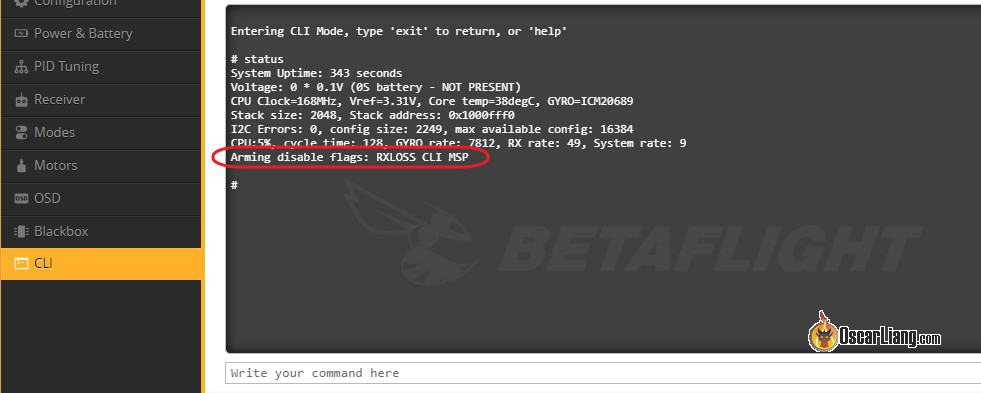
Alternatively, you can check in the CLI by entering the command “status”, the last line is the list of arming prevention flags.
Further Reading: How to use CLI in Betaflight?
Buzzer Beeping
If you don’t have a computer, but your quad has a buzzer, the beeping should also indicate the disarm flags. Here’s how to decipher the beeping pattern:
- Five short beeps for just attention, which can be ignored
- A number of long beeps
- A number of short beeps with long intervals
Each long beep represents 5, while each short beep represents 1. The final flag number can be calculated as 5 x <the number of long beeps> + <the number of short beeps>.
For example:
- 0 long beep and 2 short beeps = 2
- 1 long beep and 3 short beeps = 8
- 2 long beeps + 0 short beeps = 10
Arming Prevention Flags Lookup Table
Once you’ve found the arming disabled flag numbers or names, match them with this handy table to decode the issue. The info is from the Betaflight wiki.
| Name | Description | Beep code | Required Actions |
| NOGYRO | A gyro was not detected | 1 | You may have a hardware failure, if a previous firmware version works then it may be a firmware issue. Or you might have flashed a wrong target. |
| FAILSAFE | Failsafe is active | 2 | Rectify the failure condition and try again. |
| RXLOSS(1) or RX_FAILSAFE | No valid receiver signal is detected | 3 | Your receiver is either faulty or has no link to the transmitter. |
| BADRX(1) | Your receiver has just recovered from receiver failsafe but the arm switch is on | 4 | Switch the arm switch off. |
| BOXFAILSAFE | The ‘FAILSAFE’ switch was activated | 5 | See FAILSAFE |
| RUNAWAY | Runway Takeoff Prevention has been triggered | 6 | Disarm to clear this condition. |
| CRASH | Crash Recovery has been triggered | 7 | Disarm to clear this condition. |
| THROTTLE | Throttle channel is too high | 8 | Lower throttle below min_check. |
| ANGLE | Craft is not level (enough) | 9 | Level craft to within small_angle degrees (default 25). |
| BOOTGRACE | Arming too soon after power on | 10 | Wait until pwr_on_arm_grace seconds (default 5) have elapsed. |
| NOPREARM | Prearm switch is not activated or prearm has not been toggled after disarm | 11 | Toggle the prearm switch. |
| LOAD | System load is too high for safe flight | 12 | Revisit configuration and disable features. |
| CALIB | Sensor calibration is still ongoing | 13 | Wait for sensor calibration to complete. |
| CLI | CLI is active | 14 | Exit the CLI. |
| CMS | CMS (config menu) is Active – over OSD or other display | 15 | Exit the CMS (or OSD menu). |
| OSD | OSD menu is active | Exit OSD menu. | |
| BST | A Black Sheep Telemetry device (TBS Core Pro for example) disarmed and is preventing arming | 16 | Refer to the manual for your hardware. |
| MSP | MSP connection is active, probably via Betaflight Configurator | 17 | Terminate the Betaflight Configurator connection (disconnect). |
| PARALYZE | Paralyze mode has been activated | 18 | Power cycle/reset FC board. |
| GPS | GPS rescue mode is configured but required number of satellites has not been fixed | 19 | Wait for GPS fix, enable arming without GPS fix, or disable GPS rescue mode. |
| RECOVERY | (wiki incomplete) | (wiki incomplete) | (wiki incomplete) |
| RESCUE_SW | GPS Rescue switch is in an unsafe position | 20 | Turn off the GPS Rescue switch to arm. |
| RPMFILTER(2) | Motor RPM-based filtering is not functioning | 21 | One or more ESC’s are not supplying valid RPM telemetry. |
| REBOOT_REQD | Reboot required | 22 | Reboot the flight controller for settings changes to take effect. |
| DSHOT_BBANG | DSHOT Bitbang is not working | 23 | (3) |
| NO_ACC_CAL | Accelerometer calibration required | 24 | Calibrate the accelerometer or disable features that use it |
| MOTOR_PROTO | ESC/Motor Protocol not configured | 25 | Select the ESC/Motor protocol to use on the Configuration tab. |
| ARMSWITCH | Arm switch is in an unsafe position | 26 | Toggle the arm switch to arm. |
Other Common Issues
If Betaflight shows no arming disabled flags, the problem might be something else. Here are a few more things to check:
Accelerometer Issues
If the Maximum Arm Angle in Configuration tab is set below 180 (default value 25), your quad must be under this angle in order to arm. In that case, ensure your quad is on a level surface, and calibrate the ACC on a level surface.
If you wish to be able to arm the drone regardless the angle it’s in, you can disable Maximum Arm Angle by entering 180. Some people prefer to do this as it allows them to arm the quad when they are stuck in trees and they might be able to shake it out. But obviously this could be a safety concern, so do this at your own risk.
A faulty accelerometer could also contribute to the issue, try disabling accelerometer in the Configuration tab if you don’t normally fly in Angle/Horizon/Rescue modes.
CPU Usage
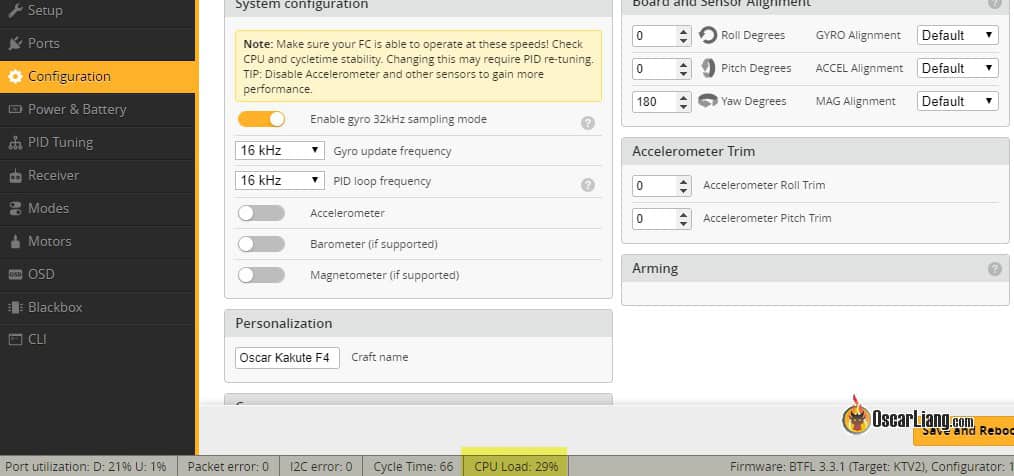
When CPU load is too high, Betaflight will refuse to arm. You can find out the CPU load at the bottom of Betaflight Configurator.
Keep the CPU load below 80% (since BF4.3) by adjusting settings, such as lowering PID loop frequency, and disabling unnecessary features such as LED and soft serial.
Throttle Issues
Ensure your throttle is correctly calibrated. When your throttle channel’s lowest value is too high, Betaflight will refuse to arm. Ideally your channel endpoints should be 1000 and 2000. 10-12 below 1000 and above 2000 is usually fine, such as 988/990 – 2010-2012, but definitely not above 1000 and below 2000, that’s bad, in which case you might want to calibrate your radio endpoints.
Betaflight doesn’t arm if your minimum throttle is too high (higher than the setting “Min_Check”). This is a safety feature so that the quad doesn’t suddenly spin up the motors and hurt you when it’s armed. You must ensure that your throttle is lower than min_check when it’s in the lowest stick position. Min_Check is 1050 by default.
Moron threshold
Some FC might have more sensitive gyro’s and the drone would refuse to calibrate and initialize after power up, and therefore you can’t arm it. By increase “gyro_calib_noise_limit” (originally known as Moron Threshold) in CLI can reduce gyro sensitivity during initialization. Try setting it to 100 or even 120.
Conclusion
I hope you found this guide helpful! Let me know in the comment if your arming problem was caused by something else that wasn’t covered in this tutorial. If you are still having problems arming your quad after following this guide, please post your question on our forum, our community is always here to support and learn together. Happy flying!
Edit History
- Jun 2018 – Tutorial created.
- Feb 2024 – Updated.





