
Software as a service (SaaS) is one of the three primary tiers of cloud computing, together with platform as a service (PaaS) and infrastructure as a service (IaaS).
The SaaS model allows companies to redirect resources (otherwise spent on IT hardware, software, and personnel) to fulfill other business needs.
In the last couple of years, the global SaaS market generates around $250 billion yearly, accounting for the number of SaaS tools and platforms used by numerous users across industries.
This guide walks you through everything you need to know about SaaS application development services, from architecture and pricing to examples and best practices, so you can successfully build and scale any SaaS application.
What Is SaaS Application Development?
The development of SaaS solutions involves creating software that can be distributed as a service via the internet, not as a packaged software product to be installed.
In other words, users don’t buy software outright or install it on individual machines. Instead, they access it through a web browser or mobile app and pay for it through a subscription (monthly, yearly, or usage-based). The provider hosts, maintains, and updates the application in the cloud.
Some attributes of SaaS products include the following:
- Multi-Tenancy: A single application instance serves multiple customers (tenants), while keeping each tenant’s data logically separated.
- Cloud-Native Infrastructure: SaaS applications are built to run on cloud platforms like AWS, Azure, or Google Cloud.
- Subscription-Based Model: Instead of one-time purchases, users pay recurring fees based on usage, features, or tiers.
- Continuous Delivery: Updates, bug fixes, and new features are deployed frequently without requiring users to install anything.
- Centralized Maintenance: The provider manages everything: servers, security patches, performance optimization, and scaling.
| Area | Element | Description |
| Core Components | Frontend | User interface (web/mobile app) |
| Backend | Business logic and processing | |
| Database | Stores user and application data | |
| APIs | Connect services and integrations | |
| Multi-Tenancy Models | Shared DB, Shared Schema | Low cost, less isolation |
| Shared DB, Separate Schema | Balanced isolation and cost | |
| Separate DB per Tenant | High isolation, higher cost | |
| Modern Trends | Microservices | Modular, scalable services |
| Serverless | Cloud-managed infrastructure | |
| Event-Driven | Real-time system communication |
SaaS Architecture Explained (Short Table)
Types of SaaS Applications
There is a wide range of SaaS applications available today, depending on the audience for whom it was created, what challenges it solves, and its marketing positioning.
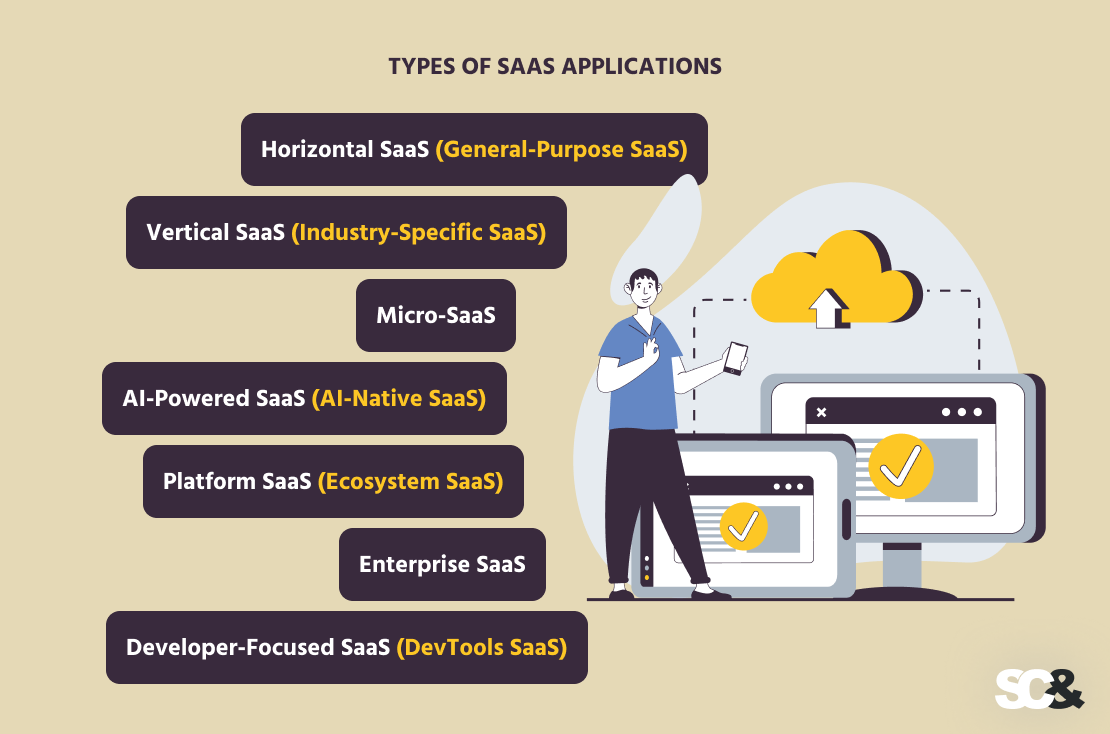
Horizontal SaaS (General-Purpose SaaS)
This type of application means software created to address multiple audiences from various industries instead of being industry-specific.
Horizontal SaaS applications solve general business challenges, such as communication, managing customers or boosting productivity of a company.
Since these are common problems that exist everywhere and do not depend on the size of the company or industry, the primary goal is to target large audiences and ensure good usability.
Examples of products:
Vertical SaaS (Industry-Specific SaaS)
Vertical SaaS focuses on solving problems for a specific industry or professional domain. Instead of serving everyone, these platforms concentrate on serving one segment exceptionally well, such as healthcare, real estate, legal services, or construction.
This specialization allows vertical SaaS products to embed themselves deeply into industry workflows, often becoming essential operational tools.
While the total addressable market may be smaller than horizontal SaaS, vertical SaaS often benefits from reduced competition and higher pricing power due to its specialized nature.
Examples of products:
- Patient management systems
- Property management platforms
- Case management tools
Micro-SaaS
Micro-SaaS refers to small, highly focused software products that typically solve a very specific problem for a niche audience.
These products are often built and maintained by small teams or even solo founders, using modern cloud infrastructure and automation tools to keep operations lightweight.
In contrast to traditional SaaS applications, which tend to have numerous features, a Micro-SaaS focuses on one specific task and executes it flawlessly.
Examples of products:
- A tool that converts invoices into accounting formats
- A browser extension for SEO analysis
- A scheduling tool for a specific profession
AI-Powered SaaS (AI-Native SaaS)
An AI native SaaS application incorporates AI into its functioning right from the very beginning, making it a crucial component instead of an optional one. Machine learning algorithms or large language models are used within these systems to automate tasks, generate insights, or enhance decision-making.
In 2026, AI-native SaaS is becoming one of the most impactful categories because it shifts software from being purely tool-based to becoming more autonomous and adaptive.
Examples of use cases:
Platform SaaS (Ecosystem SaaS)
Platform SaaS refers to applications that extend beyond a single product and instead provide a foundation for other developers, businesses, or third-party tools to build upon.
These platforms typically offer APIs, SDKs, and integration frameworks that allow external systems to connect and extend functionality.
The value of platform SaaS lies in its ecosystem effect. As more developers build on top of the platform, its utility increases, creating strong network effects and long-term user retention.
Some Examples:
- Payment platforms
- Communication APIs
- Workflow automation platforms
Enterprise SaaS
Enterprise SaaS is designed specifically for large organizations with complex operational requirements, strict security standards, and high scalability needs.
Unlike consumer-focused SaaS, enterprise solutions often include advanced features such as role-based access control, audit logs, compliance certifications, and deep integration capabilities with existing enterprise systems.
Examples:
- ERP systems
- Enterprise CRM platforms
- HR management systems
Developer-Focused SaaS (DevTools SaaS)
Developer-focused products are built specifically for engineering teams and software developers to improve productivity, infrastructure management, and software delivery processes.
These tools are often deeply technical and include services for API management, monitoring, continuous integration and deployment, and cloud infrastructure automation.
Use cases:
- API management
- Monitoring and observability
- CI/CD pipelines
- Cloud infrastructure tools
| Feature | Traditional Software | Web App | Cloud App | SaaS |
| Installation | Required | No | No | No |
| Access | Local device | Browser | Internet/API | Browser/app |
| Hosting | On-premise | Local or cloud | Cloud | Cloud |
| Scalability | Low | Medium | High | Very high |
| Updates | Manual | Partial | Automatic | Fully automatic |
| Maintenance | User-managed | Varies | Shared | Provider-managed |
| Pricing | One-time | Varies | Pay-as-you-go | Subscription |
| Multi-tenancy | No | Rare | Possible | Yes |
Traditional Software vs Web App vs Cloud App vs SaaS
Benefits of SaaS Application Development
SaaS eliminates the need for purchasing, installing, and updating software, thus offering convenience not only for end users but also for businesses alike.

For Businesses
From a business standpoint, there is an inherent difference between SaaS applications and traditional apps when it comes to development and monetization.
Namely, it becomes easier to start working with the application without having to invest heavily into its development.
It means that companies can use cloud-based solutions and pay for them depending on actual usage. As far as costs go, it significantly lowers the barrier to entry into the market and provides an opportunity for faster launching of new products.
In addition to costs, SaaS provides a very stable source of income via recurring subscriptions. Instead of relying on one-off payments, firms can earn money using MRR or ARR (Monthly or Annual Recurring Revenue).
Predictable revenue helps companies better manage their finances, adds stability, and ultimately makes them more valuable, since the future performance of the enterprise can be better predicted.
However, scaling up should not be overlooked either. Since SaaS solutions run on a cloud platform that can be scaled up with demand, a company will be able to start their product without worrying about having to rewrite the code once they have millions of users.
For Users
From a user’s perspective, one of the most immediate advantages is accessibility. Being hosted in the cloud, these tools can be accessed using any web browser or smartphone application, regardless of where a user currently resides.
The next advantage is related to how updates work. In traditional software, it’s necessary to either download patches or upgrade the whole application manually, thereby breaking the workflow and potentially resulting in the existence of different versions of the software.
With SaaS, all updates are performed by the software providers. Thus, users get all the newest capabilities, optimization features, and even improved security measures without lifting a finger.
Lastly, SaaS greatly reduces maintenance needs. This means that all aspects of keeping the software running properly are taken care of by the SaaS provider. These include everything, from the management of the hardware environment up to backup services and upgrades.
How to Build a SaaS Application: Development Lifecycle
The SaaS development process describes the comprehensive journey of ideation, building, testing, launching, and further maintenance of a product.
Unlike the traditional software development approach for applications, which involves the creation phase alone, SaaS involves a repetitive lifecycle of developing, testing, deploying, and improving.
1. Idea Validation
Each SaaS service needs to be tested to verify if there is a valid problem worth solving with its creation. At this phase, market studies need to be performed to find the right audience and their pain points, and see if people will be ready to pay for this kind of solution.
2. Product Planning and Requirement Definition
After the initial validation, it’s time to start planning and defining the exact set of features for the product. The objective is to focus on the key functionalities while avoiding unnecessary features that will complicate the process of development.
3. MVP Development
This stage revolves around developing a bare bones version of the software that offers core functionality and solves users’ problems. In other words, the main objective here is to build basic features that help resolve the problem rather than creating an elaborate product.
4. Testing and Iteration
Once the MVP version is developed, it goes through several rounds of software testing. These include testing for performance, security, and stability of the product. User feedback becomes especially crucial at this stage as it enables identifying gaps and making necessary changes to improve functionality.
5. Launch and Market Entry
After the product is stabilized and validated through testing, it is introduced to the market. During this stage, the application is deployed, monitoring systems are put in place, and the go-to-market strategy, including marketing, onboarding, and price activation, is carried out.
6. Scaling and Optimization
The next step after deployment is optimization and scaling to confirm that the application can cope with an increasing number of users, data volumes, and traffic. The process also includes the optimization of the infrastructure and pricing strategy.
7. Continuous Improvement and Evolution
SaaS software is never truly “finished.” The product continues to improve as the product team implements enhancements, introduces new features, and optimizes performance. Monitoring the market and taking customer feedback into account helps in deciding the next steps for the product.
| Step | Focus |
| 1. Validate Idea | Market demand, competitor analysis, problem–solution fit |
| 2. Define Features | MVP scope, must-have vs nice-to-have features |
| 3. Choose Tech Stack | Frontend, backend, database, cloud provider selection |
| 4. Design UX/UI | Simple onboarding, SaaS UX patterns, usability |
| 5. Build MVP | Agile development, fast iteration, core functionality |
| 6. Multi-Tenancy | Data isolation, scalability, tenant architecture |
| 7. Security & Auth | OAuth/SSO, encryption, compliance standards |
| 8. Payments | Subscription setup, billing tools (Stripe, Paddle) |
| 9. Testing | Unit testing, integration testing, load testing |
| 10. Launch | CI/CD deployment, release, monitoring setup |
Step-by-Step: How to Build a SaaS Application
Essential SaaS Features
There are common essential features used by most successful SaaS solutions. Even though different products have unique functionalities depending on the product category, these essential features are vital in ensuring that the software is usable and monetizable.
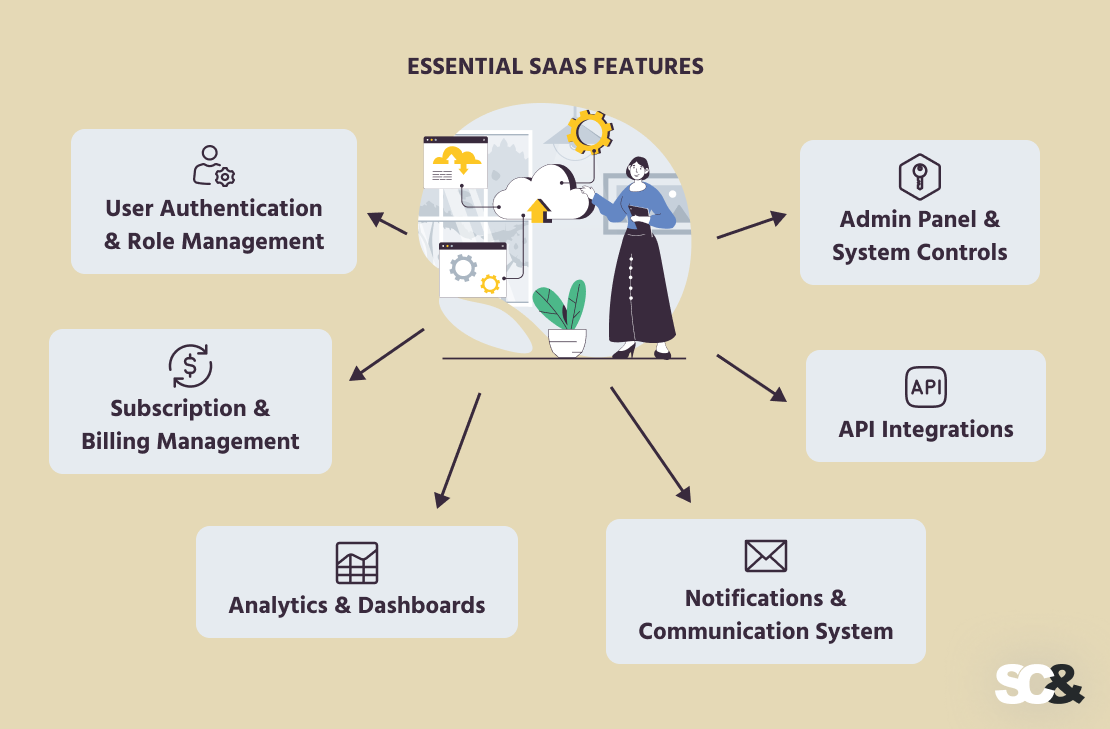
User Authentication & Role Management
One of the key elements used in SaaS is user authentication since this enables users to access the platform.
Typically, a SaaS app enables its users to register and log in using either single sign-on or other types of authentication, which may include two-factor or multi-factor authentication.
In addition to user authentication, there is role-based access control that gives various roles within a company distinct permissions on a particular SaaS application.
Subscription & Billing Management
As SaaS relies heavily on a recurring revenue business model, there must be functionality in place for dealing with subscriptions and recurring billing.
SaaS services usually have a capability for subscription management, billing, upgrading/downgrading subscription levels, and invoice automation.
Analytics & Dashboards
The analytics module provides insight into how users perform or behave in terms of their activity or performance metrics depending on the software product. In most cases, the dashboard is designed to help users visualize analytics data easily. On the business end, SaaS companies can leverage analytics for tracking the level of engagement and retention.
Notifications & Communication System
Communication inside a software application is critical to engaging users and retaining them for long-term success. The notification system provides updates to users about their account activity or any important system updates related to billing or new features.
API Integrations
SaaS applications are very unlikely to be used in isolation today. Thanks to integration possibilities, the software can integrate with external systems, including payment gateways, CRMs, analysis tools, and collaboration platforms. Proper API design allows developers to expand the product’s capabilities with custom features and integrations.
Admin Panel & System Controls
An admin panel gives system administrators or other internal users complete control over the SaaS application. These functions include user management, activity monitoring, configuration, and handling any support requests.
Typical SaaS Tech Stack (2026 Edition)
Unlike one specific technology stack, SaaS solutions are created with different layers, each of which is intended for different system parts. The main idea is to develop a scalable, high-quality, efficient, and updatable application.

At the frontend layer, most SaaS applications use frameworks like React (often with Next.js), Vue, or Angular to build clean and responsive interfaces.
Developers commonly use TypeScript for better code quality, along with tools like Tailwind CSS or Material UI to design user interfaces quickly.
On the backend, popular choices include Node.js (with Express or NestJS), Python (Django or FastAPI), and sometimes Go or Java (Spring Boot) for more complex systems.
Some teams also use full-stack frameworks like Next.js or Remix to simplify development, especially in the early stages.
For storing data, SaaS apps rely on PostgreSQL or MySQL for structured data, and MongoDB or DynamoDB for more flexible use cases. Tools like Prisma or Sequelize make it easier to work with databases, while platforms like Supabase or Firebase provide ready-made backend features.
The application runs on cloud infrastructure, usually provided by AWS, Google Cloud, or Microsoft Azure. Simpler deployments often use platforms like Vercel, Netlify, or Render. More advanced systems may use Docker and Kubernetes, while serverless tools like AWS Lambda help apps scale automatically without managing servers.
For authentication and payments, developers use ready-made services. Tools like Auth0, Clerk, or Firebase Auth handle login and security, while Stripe, Paddle, or Chargebee manage subscriptions and billing.
To keep everything under control, SaaS teams use monitoring and analytics tools, such as Datadog, Prometheus, Mixpanel, or Amplitude, along with Sentry or LogRocket for tracking errors.
Updates are managed through CI/CD tools like GitHub Actions or GitLab CI, which automate testing and deployment.
Finally, many SaaS apps now include an AI layer, using OpenAI APIs, LangChain, or LlamaIndex to add features such as chatbots, automation, or smart recommendations.
SaaS Pricing Models
Pricing is a core part of any SaaS software product because it directly impacts revenue, growth, and user adoption.
Subscription-Based Pricing
This is the most traditional and widely used SaaS pricing model. Users pay a fixed fee on a monthly or yearly basis to access the software. It provides predictable revenue for businesses and simple and consistent pricing for users.
Freemium Model
In the freemium model, users can access a basic version of the product for free, with the option to upgrade to a paid plan for advanced features. This approach lowers the barrier to entry and helps attract a large user base.
Tiered Pricing
Tiered pricing offers multiple plans at different price points, each with a distinct set of features or limits. For example, plans might be labeled as Basic, Pro, and Enterprise.
This model allows businesses to serve different customer segments, from individuals to large organizations.
Usage-Based Pricing (Pay-as-You-Go)
In this model, users are charged based on how much they use the product. This could be based on API calls, storage, number of users, or transactions.
Hybrid Pricing Models
Many modern SaaS products combine multiple pricing strategies. For example, a company might offer a base subscription fee plus usage-based charges, or a freemium plan combined with tiered upgrades.
Challenges in SaaS Development Services
Although the SaaS model comes with numerous advantages, its high performance, security, and profitability require consistent work from a technological perspective as well as a business one.
The first challenge concerns scalability and performance. Since it should keep up with growing demand from users, SaaS solutions demand effective architecture design, highly efficient databases, and adequate infrastructure development.
The second issue concerns security and safety. The fact is that SaaS operates in a multi-tenant environment, which means that even a single vulnerability can jeopardize numerous clients. Consequently, the key factors here are encryption, authentication, and regulatory compliance.
From the business perspective, a big issue is customer retention. Although SaaS businesses face fewer issues when it comes to acquiring new customers, their products still need regular improvement.
Moreover, SaaS applications depend on different third-party technologies, such as payment processing solutions, APIs, and various analytical platforms. Therefore, their reliable operation is crucial for keeping the application working properly.
The fifth problem is associated with costs. Namely, growing demand means higher operating expenses, which, in turn, calls for effective cost management.
Cost of SaaS Application Development
Costs of developing a SaaS product are influenced primarily by its complexity, the developers’ expertise, and technical architecture. The more complex and feature-rich a product is, the higher the cost involved in its development.

In terms of price ranges, MVP development services may cost somewhere between $20,000 and $100,000, while a mid-scale product costs around $100,000-$500,000 and enterprise solutions usually exceed this amount.
Beyond initial development, SaaS also involves ongoing costs such as cloud infrastructure, maintenance, security, and customer support. As a result, SaaS should be viewed as successive investments rather than a one-time expense.
Real-World Examples of SaaS Applications
SaaS applications are used across nearly every industry, from small startups to large enterprises. While they vary in purpose, the most successful SaaS products share common traits: strong user experience, clear value, and the ability to scale efficiently.
One well-known example is Salesforce, a leading customer relationship management platform. It helps businesses manage sales, customer data, and marketing workflows in a single cloud-based system.
Its success comes from deep customization, scalability, and a strong ecosystem of integrations.
Another widely used SaaS project is Slack, which focuses on team communication and collaboration. By replacing traditional email workflows with real-time messaging, Slack demonstrates how SaaS can improve productivity through simplicity and integrations with other tools.
In the productivity space, Notion provides an all-in-one workspace for note-taking, project management, and knowledge sharing. Its flexibility and user-friendly design show how SaaS products can adapt to different workflows and user needs.
Custom-Built SaaS Solution Examples
Beyond well-known platforms, SaaS is also widely applied in custom enterprise solutions.
For example, SCAND has developed an HR Portal that streamlines internal HR processes such as employee management, onboarding, and workflow automation in a centralized cloud-based system.
Another example is a custom PIM platform for workwear procurement automation, made to manage complex product data, supplier workflows, and procurement processes in a unified SaaS environment.
Also, the SCAND team built an AI-powered field service management platform for storm recovery, which helps coordinate field teams, manage live operations, and optimize resource allocation during emergency response scenarios using intelligent automation and cloud-based coordination tools.
How to Choose a SaaS App Development Partner
Choosing the right SaaS development partner is important because it directly affects your product’s quality, scalability, and long-term success. The ideal partner should act as a technical advisor who can help you design, build, and scale your SaaS product effectively.

First, look for proven SaaS experience, especially with multi-tenant systems, subscription billing, cloud infrastructure, and scalable architectures. SaaS is different from standard web development, so domain-specific experience is essential.
Second, evaluate their technical expertise, including modern stacks like React, Node.js, Python, cloud platforms (AWS, Azure, GCP), and DevOps tools such as Docker, Kubernetes, and CI/CD pipelines. They should also be able to design systems that scale smoothly as your user base grows.
Third, review their portfolio and case studies to confirm they have built real SaaS products with production usage, integrations, and complex features, not just basic websites or prototypes.
A good example of a full-cycle SaaS development partner is SCAND. We provide end-to-end services including SaaS product design, cloud architecture, development, DevOps, and long-term support, helping companies build and scale complex SaaS platforms.
We build scalable, multi-tenant SaaS platforms with secure APIs, third-party integrations, and cloud-native infrastructure using technologies such as AWS and Azure. We also set up CI/CD pipelines, containerization, and automated deployments to ensure fast, reliable, and continuous delivery.
The main benefit of working with our teams is that clients get a complete end-to-end development partner instead of coordinating multiple vendors.
Such an approach allows faster time-to-market, a scalable and well-structured architecture from the start, and ongoing support as the product unfolds.
Frequently Asked Questions (FAQs)
What are SaaS application development services?
In simpler terms, it’s the process of building software that runs in the cloud and is accessed over the internet, usually through a subscription. Instead of installing software on a device, users simply log in and use it online.
How is SaaS different from traditional software?
Traditional software is installed and maintained on a local device, while SaaS runs in the cloud. With SaaS, updates, maintenance, and scaling are handled by the provider, and users always access the latest version through the internet.
How long does it usually take to build a SaaS product?
It really depends on complexity. A basic MVP can take around 3–6 months, while a more complete, scalable SaaS platform with advanced features can take 6–12 months or more.
How much does it cost to develop a SaaS application?
Costs vary a lot based on features, scale, and development teams. A simple MVP might start around $20K–$100K, while mid-level products can range from $100K–$500K, and enterprise SaaS platforms can go beyond that.
What features are essential in a SaaS application?
Most SaaS products need things like user login and roles, subscription management, dashboards, analytics, integrations, notifications, and an admin panel to manage the system.
What technologies are commonly used in SaaS development?
Most teams use React or Next.js on the frontend, Node.js or Python on the backend, PostgreSQL or MongoDB for databases, and cloud platforms like AWS, Azure, or Google Cloud for hosting and scaling.
Is SaaS still a good business model in 2026?
Yes, definitely. SaaS is still one of the strongest models because it offers recurring revenue, easy scalability, and fits well with modern cloud-based and AI-powered products.





