Quick answer: Maximum volumetric speed is the amount of molten plastic your hotend/filament combination can reliably deliver per second, expressed in mm³/s. OrcaSlicer includes a dedicated calibration because the correct value depends on filament, nozzle, temperature, hotend and extruder — not only on the printer model.
Why mm/s can mislead you
Movement speed alone does not tell you how much plastic must be melted. A printer moving at 250 mm/s with a 0.20 mm layer and narrow extrusion can demand less material than a slower print using a 0.30 mm layer and wide line.
A simplified relationship is:
Volumetric flow ≈ line width × layer height × print speed
Why you should calibrate per filament
OrcaSlicer’s documentation notes that maximum volumetric speed varies with material, machine, nozzle diameter and extruder setup. Even filament brand and color can change the practical limit. That is why a generic PLA profile should be treated as a starting point, not a law.
Before the test: remove other variables
- Dry the filament if the material is moisture sensitive.
- Use a clean nozzle in known condition.
- Calibrate temperature first.
- Confirm basic flow/extrusion multiplier.
- Use the nozzle size and hotend you actually intend to print with.
- Disable unusual experimental cooling or speed overrides.
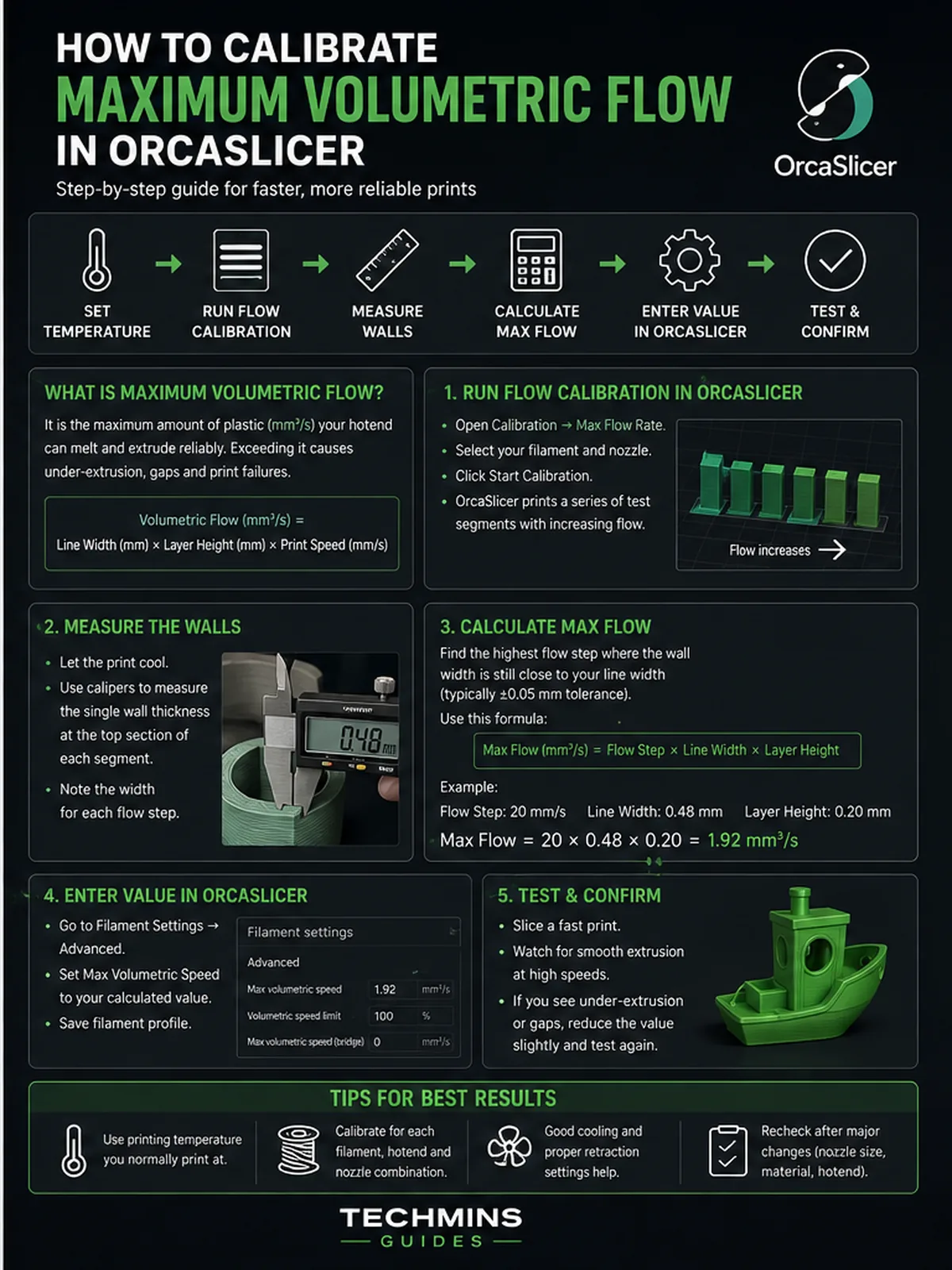
Run the OrcaSlicer test
Use OrcaSlicer’s Calibration menu and select the maximum volumetric speed/flow-rate calibration. Choose sensible start, end and step values for your material. Do not start so high that the first section is already failing badly.
What you are looking for
The limit is not necessarily where the extruder finally clicks. Quality often degrades before that. Watch for:
- Surface becoming rough or matte unexpectedly.
- Visible under-extrusion.
- Lines no longer fully merging.
- Layer bonding becoming weaker.
- Extruder skipping or grinding.
- Geometry changing as flow demand rises.
Choose the last clean region, not the first disaster
The practical maximum should sit below obvious failure. If quality is excellent at 18 mm³/s, questionable at 20 and poor at 22, do not set the profile to 22 because “it still extruded.” Use a margin below the first consistent degradation.
How much safety margin?
There is no universal percentage. A production profile deserves more margin than a speed-benchmark profile. A material that changes noticeably with temperature or moisture also deserves more headroom.
A good approach is to find the repeatable clean limit, then reduce it enough that normal temperature variation, long travel between high-flow sections and spool condition do not push the print over the edge.
Temperature changes the result
Higher nozzle temperature usually lowers melt viscosity and can increase usable flow, but pushing temperature too far can hurt surface quality, bridging, stringing or polymer stability. The fastest setting is not automatically the best setting.
Nozzle diameter changes the system
A 0.6 mm nozzle can demand much more flow than 0.4 mm. It may also allow filled filament to pass more easily. But your heater must still melt the requested mass of polymer. A bigger hole does not create more thermal power.
High-speed filament: test it instead of trusting the label
If a spool is marketed as “high speed,” this calibration is exactly how to decide whether the claim matters on your printer. Compare its clean maximum flow with your normal material using the same nozzle and realistic temperature range.
Where to store the result
Maximum volumetric speed belongs in the filament/material profile in OrcaSlicer. This lets the slicer cap linear speed automatically when a wider line or taller layer would exceed the melt limit.
Validate with a real part
A calibration tower is controlled. A real part contains accelerations, small features, cooling changes and different line types. After setting the value, print a representative object with long walls and high-flow infill. Inspect the fastest regions.
Common mistakes
Using a value from someone else’s printer
Different hotend, nozzle, filament batch and temperature can change the result significantly.
Calibrating wet filament
Moisture can reduce consistency and make the “limit” look lower or more erratic than it really is.
Chasing maximum speed before temperature and flow are right
You are measuring the whole extrusion system. If basic calibration is wrong, the number is not meaningful.
Setting the profile exactly at first failure
That leaves no margin for normal variation.
Techmins rule for fast printing
Motion capability tells you how fast the toolhead can move. Maximum volumetric flow tells you how fast the material can be deposited. Your real print speed is limited by whichever becomes the bottleneck first.
Bottom line
Maximum volumetric flow calibration is one of the most useful tests on modern high-speed printers because it replaces marketing speed with a measurable material/hotend limit. Calibrate it per filament, leave margin and validate on a real print.