
It’s important to ensure our FPV drone is receiving the correct commands from our radio transmitter. By calibrating channel mid point and end points, your drone will fly more reliably and precisely. In this tutorial, I’ll guide you through correcting your radio channels’ midpoints and endpoints.

For insights on selecting a good radio transmitter, check out my other post: https://oscarliang.com/radio-transmitter/
While adjustments are typically needed for Roll, Pitch, Yaw, and Throttle channels, AUX channels (used for switches) usually don’t require tweaking unless they’re significantly off.
What Are Mid-Point and End-Points?
Radio channels have a range of 1000 to 2000 – these are the endpoints. 1500, being the middle of this range, is the midpoint.
The Issue with Incorrect Midpoints
Ideally, the midpoints for Roll, Pitch, and Yaw channels should be at 1500 when the sticks are in their neutral positions. If these are off, you might notice your drone drifting when it should be stable. A well-calibrated quadcopter remains steady and moves as directed; incorrect midpoints, however, lead to unwanted drift and constant manual adjustments.

Incorrect mid points on Roll, Pitch and Yaw channels
Initial Steps: Centering Trims
First off, ensure your trims haven’t been accidentally adjusted. Center all trim buttons — keep pushing the trim button left, or right, until you hear an audio cue, “trim centered” along with a haptic vibration.
If this doesn’t rectify your issue, it’s time to move on to calibration.
Calibrating Gimbals
Head over to the Radio Setup page, cycle through until you reach the “HARDWARE” page, and select “Sticks Calibration”. Follow the on-screen prompts carefully.

Make sure you only move the sticks as shown in the following image. For best result, avoid moving the sticks in circle. Be as gentle as possible when pushing the sticks, so the radio reads the end points correctly.

Adjusting Channel Midpoint
To adjust midpoints, navigate to the Outputs page on your EdgeTX radio. Access this by pressing the MDL key and cycling through with the PAGE button until you reach “OUTPUTS.” Here, focus on the first four channels (CH1 to CH4), corresponding to roll, pitch, throttle, and yaw. This assumes you have the default AETR channel map in Betaflight, if you use a different channel map, these channels might be in a different order. Learn more about channel map: https://oscarliang.com/channel-map/

Select the channel to adjust and hit “Edit”.

Modifying the PPM Center value alters the midpoint, as updated in real time in the Receiver tab in Betaflight Configurator. Roll, pitch, and yaw should all hit a midpoint of 1500; throttle midpoint adjustments are unnecessary.

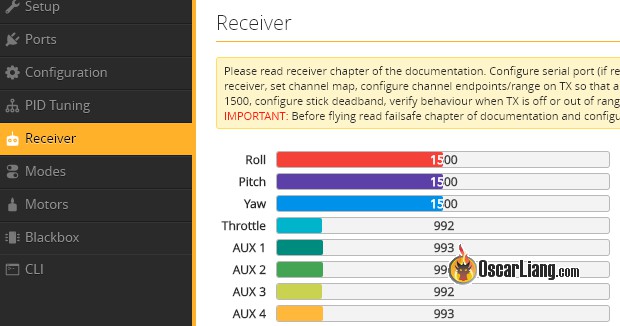
Correct channel mid points at 1500
In some setups, jittering might occur at mid point (e.g., 1498-1502), potentially caused by gimbal wear. It’s not a big issue, just get the mid point as close to 1500 as possible, then apply a “deadband” in Betaflight to minimize jittering in flight. For example if mid point jitters around 1498-1502, apply a deadband of 2.
Addressing Incorrect Endpoints
Having the full stick range ensures precise control — this means the lowest and highest channel values should be 1000 and 2000. Incorrect endpoints results in loss of stick resolution, it may even prevent the quad from arming.
Testing Channel Endpoints
In Betaflight Configurator’s receiver tab, check the minimum channel values by moving your transmitter sticks to the bottom left. Ideally, they should be around 1000 (however, slightly lower is acceptable, such as 988-999).

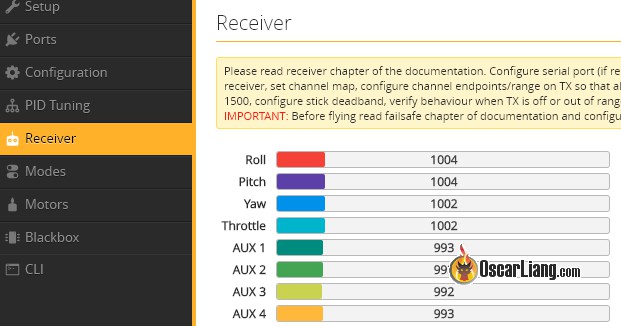
Incorrect min end points
Now, to get the maximum values, move the sticks to the top right. Ideally they should be 2000 (slightly higher is tolerable, such as 2001-2012).


Incorrect max end points
If these values are not 1000-2000, then you should consider fixing them by following the instructions below.
Adjusting Endpoints
Endpoints can be adjusted:
- directly on your EdgeTX radio’s Outputs page,
- or via Betaflight’s RXRange CLI command.
EdgeTX Outputs
Go to the Outputs page in your EdgeTX radio. The parameters we want to change are Min and Max.

Adjust Min until you reach the desired 1000 endpoint.
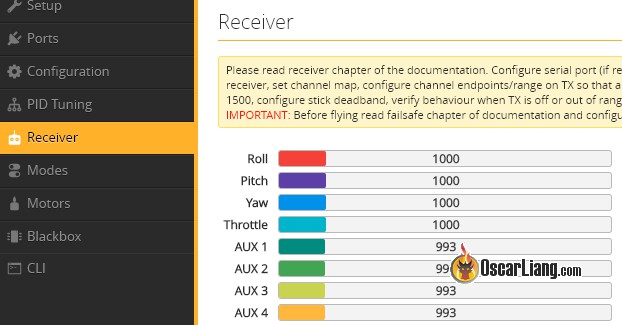
Correct min end points
Then adjust Max until the highest channel value reads 2000.
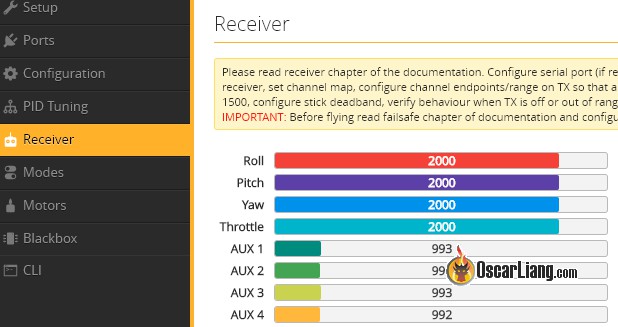
Correct max end points
Repeat this for all four channels: roll, pitch, yaw and throttle.
If you can’t get your endpoints to 1000 and 2000 without going over 100%, make sure “Extended Limits” (E. Limit) is enabled in the MODEL SETUP screen.

Using RXRange
For those who cannot adjust their endpoints in the radio, you can also do it in Betaflight using the “RXRange” command.
Enter “dump” in CLI, and locate the 4 lines begin with “rxrange“. They represent the first 4 channels in the radio, e.g. Roll, Pitch, Throttle and Yaw. (You should verify if that’s the correct channel map in your setup)
rxrange 0 1000 2000 rxrange 1 1000 2000 rxrange 2 1000 2000 rxrange 3 1000 2000
Move your sticks to the lowest position (bottom left), write down the channel values in the Receiver Tab.
Repeat this by moving the sticks to the highest position (top right).
For example, if our roll has endpoints of 1004-1995, we should enter this command in the CLI to achieve the 1000-2000 endpoints, i.e.
rxrange 0 1004 1995 save
You can now repeat for the other 3 channels:
rxrange 1 1004 1997 rxrange 2 1004 1996 rxrange 3 1002 1999 save
Now all 4 channels should give you 1000 to 2000 end points respectively. If there is still a tiny bit of difference, you can fine tune it using the first method we covered (in your radio’s Outputs page).
Are Slightly Off Endpoints Acceptable?
Slight deviations such as 988-1000 for low, 2000-2012 for high are generally fine, though losing a tiny bit of resolution at the end of stick travel.
Further Troubleshooting
If your radio has persistent inaccurate end points and mid point, it could be a sign of mechanical issue with the gimbals. Feel free to consult our forum.
Edit History
- Oct 2017 – tutorial created.
- Mar 2024 – updated for latest EdgeTX 2.9 and Betaflight 4.5.





