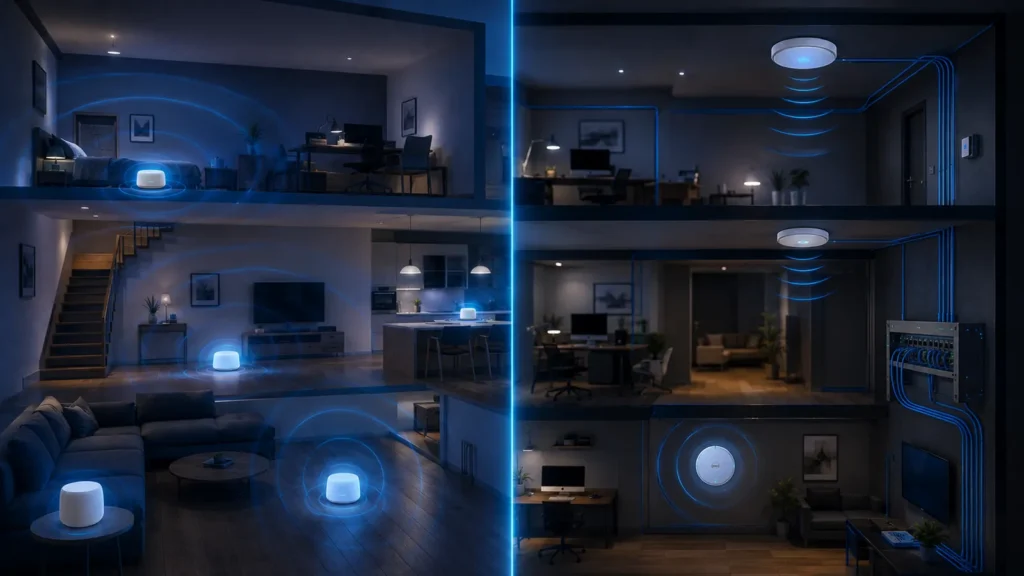
“Mesh or access point?” is really a question about network architecture. Both can put Wi-Fi closer to the rooms that need it. The important difference is how the units connect to each other, how they are managed and how much control you want over placement and backhaul.
- Coverage improves when radios are placed closer to clients, regardless of the marketing label.
- Wireless mesh is convenient but must spend radio resources on backhaul unless it has a dedicated radio or wired backhaul.
- Wired access points normally provide the most predictable capacity because Ethernet carries the upstream traffic.
- Mesh systems are usually easier to deploy and manage from one consumer app.
- If Ethernet is available, a mesh system using Ethernet backhaul can deliver much of the convenience of mesh without relying on wireless relay links.
What a mesh Wi-Fi system actually is
A consumer mesh system uses multiple coordinated Wi-Fi nodes under one management system. One unit normally connects to the modem or upstream router, while additional nodes extend coverage. The system handles SSIDs, security settings, node coordination and often channel decisions centrally.
The defining user benefit is coordination. You are not configuring several unrelated routers manually. The system presents one network and tries to move clients and backhaul traffic efficiently between nodes.
What an access point is
An access point provides Wi-Fi access to an existing network. In a conventional home or small-office design, each AP is connected to the wired LAN, usually through Ethernet. The router handles routing, firewall and internet access; the APs focus on wireless coverage.
Access points can be standalone or centrally managed. Business-oriented systems may coordinate roaming, channels and power across many APs just as a mesh platform does, but the infrastructure is usually more explicit and configurable.
The real difference is often backhaul
Backhaul is the link carrying traffic from a secondary wireless unit toward the rest of the network. If a mesh node uses Wi-Fi for backhaul, that radio link must be healthy before the node can provide good service to clients.
A wired AP uses Ethernet for backhaul, so its placement is not constrained by having to “hear” the main router over Wi-Fi. This is why wired APs are so effective in large homes, masonry buildings and multi-floor layouts.
| Area | Wireless mesh | Wired access points |
|---|---|---|
| Setup | Usually easiest | More planning/cabling |
| Backhaul | Wireless unless wired option used | Ethernet by design |
| Placement freedom | Must maintain upstream radio link | High wherever Ethernet exists |
| Peak consistency | Good to excellent with strong backhaul | Usually excellent |
| Management | Consumer-friendly centralized app | Ranges from simple to advanced |
| Expansion | Very easy within ecosystem | Flexible, but may require controller/configuration |
When mesh is the better choice
Mesh is excellent when you need two or three coverage points but do not want to design a traditional network. It works especially well in homes where one centrally placed node can maintain a strong wireless link to the next node.
- You want one app and one coordinated system.
- You cannot run Ethernet to every location.
- The home has moderate rather than extreme radio obstacles.
- You value easy expansion more than advanced control.
When access points are the better choice
Wired APs are ideal when cable is available or can be installed. They are particularly strong in larger homes, offices, thick-walled buildings and layouts where a wireless relay path would be unreliable.
- Ethernet already reaches several rooms.
- You need predictable performance at each radio location.
- You want VLANs or more advanced network segmentation.
- You prefer to upgrade router, switches and APs independently.
What about mesh with Ethernet backhaul?
This is often the sweet spot for a home. The mesh nodes keep their consumer-friendly central management, but Ethernet carries traffic between them. That removes the main radio constraint of wireless backhaul and lets you place nodes for client coverage rather than for node-to-node reception.
See Ethernet Backhaul Explained for the detailed trade-offs.
Does mesh automatically mean better roaming?
Not necessarily. Client devices ultimately participate in roaming decisions. Coordinated systems can assist with standards such as 802.11k/v/r and with consistent configuration, but a phone can still cling to a weak AP longer than you would like.
A properly configured multi-AP system can roam just as well as a mesh platform. The advantage of consumer mesh is that the coordination is usually preconfigured.
Can you turn old routers into access points?
Often yes. Many routers have an AP mode that disables routing/NAT functions and lets the device act as a wireless access point. This can be a low-cost way to improve coverage if Ethernet is available, though management and roaming coordination may be less polished than a unified system.
How many units do you need?
Do not buy a three-pack just because the house has three floors. The number depends on construction, floor area, radio bands and where users actually need capacity. Start with the fewest radios that provide reliable coverage, then add only when measurements show a gap.
Placement matters more than the label
A badly positioned premium mesh node can perform worse than a modest wired AP placed in the right room. If the node is wireless, it needs a healthy upstream link. Our mesh-node placement guide explains why putting the node in the dead zone is usually wrong.
Cost: compare the whole system
Mesh kits bundle routing, wireless radios and management. A wired AP design may require a separate router, PoE switch or injectors and cabling. The AP hardware can be inexpensive, but installation may dominate cost if cable is difficult to run.
A practical decision tree
- Do you have Ethernet where coverage is needed? If yes, wired APs or Ethernet-backed mesh are strong options.
- No Ethernet? Check whether a wireless node can receive a strong signal between router and target room.
- Want maximum simplicity? Choose a coordinated mesh system.
- Want maximum control and independent upgrades? Choose router + switch + access points.
- Still unsure? Measure first using the Techmins coverage workflow.
Real-world scenario: a three-floor home
Consider a home with the internet connection entering on the ground floor, a home office upstairs and a media room at the opposite end of the building. A single router can be excellent near the ground-floor living area but poor in the office. A wireless mesh node on the first-floor landing may solve the problem if it still has a strong link to the main unit. If Ethernet already reaches the office, however, a wired AP or Ethernet-backed mesh node removes the relay compromise entirely.
What happens when a mesh node uses the same radio for clients and backhaul?
On dual-band systems, a node may need to receive a frame over Wi-Fi and retransmit it over the same band. That consumes airtime twice for traffic crossing the relay. Tri-band systems can reduce this penalty by using a separate radio for backhaul, but a dedicated radio is still subject to walls, interference and distance.
Management and troubleshooting differences
Consumer mesh systems usually hide complexity: channel selection, node steering and firmware updates happen in one app. That is convenient, but advanced troubleshooting can be harder if the app exposes little radio detail. Dedicated AP systems often provide more visibility into channels, signal levels, roaming events and client association.
Security and network segmentation
If you want separate IoT, guest and trusted-device networks, check what the platform supports before buying. Some mesh kits provide a simple guest SSID but limited VLAN control. Business-style AP systems are more likely to support VLAN tagging and detailed policies, though they require a router/firewall capable of using them.
Can access points be “mesh” too?
Yes in the broad sense of coordinated management. Many AP ecosystems support centralized configuration, roaming assistance and even optional wireless uplinks. The practical distinction for a home is therefore less about the word mesh and more about whether each coverage point has a wired or wireless upstream path.
What about PoE?
Power over Ethernet lets one cable carry both data and power to a ceiling- or wall-mounted AP. That can make professional-looking placement easier because the AP does not need a nearby power outlet. It does require a PoE switch or injector that matches the AP’s power standard.
Upgrade flexibility over five years
A modular router + switch + AP design lets you replace one layer at a time. For example, you can upgrade the router for multi-gig internet while keeping working APs, or replace only the APs when a newer Wi-Fi generation becomes useful. Consumer mesh kits tend to encourage replacing the whole coordinated ecosystem together.